


Infosys is offering one of India’s most popular online Infosys internship opportunities for students, especially those from universities like AKTU. Check out the key details further in the blog.
The Infosys internship provides students with guided learning, hands-on project experience, skill-building courses, and an official internship certificate from Infosys Springboard.
This blog covers everything you need to know, including the eligibility criteria, domains, benefits, application process, credits, certificate, and most commonly asked questions to clearly understand the AKTU’s Infosys Springboard Internship in a clean and concise way.
Table of Contents
What Is the Infosys Springboard Internship?
The Infosys Springboard internship is a virtual internship program offered through the official learning platform of Infosys. It aims to equip students with industry-level skills through structured learning paths, assessments, guided mentorship and project work.
Key features of Infosys Internship By AKTU
- 100% virtual internship
- Self-paced + mentor-guided learning
- Industry-oriented curriculum
- Project-based learning
- Internship certificate upon completion
- Open for students across India, including AKTU-affiliated colleges
To visit the official portal of Infosys to apply for the internships, you can click here.
Key Highlights of the Infosys Internship
Some of the key highlights of the Infosys Springboard internship are mentioned below. Check them out.
- Mode: Completely online
- Duration: Typically 4-8 weeks (flexible depending on your completion pace)
- Type: Guided internship + certificate
- Eligibility: Any college student (technical & non-technical)
- Domains: IT, programming, cybersecurity, AI, business skills, soft skills
- Fee: Completely free of cost
- Certificate: Issued digitally through Infosys Springboard.
This makes it one of the best free virtual internships available in India.
Read More: AICTE Python Full Stack Developer Internship: AICTE Paid Internship Opportunity [Latest 2025]
Who Can Apply For The Infosys Internship?
You are eligible for the Infosys internship if:
- You are a student of an AKTU-affiliated institute
- You have a valid email ID & phone number
- You have a laptop/PC with internet
- You can complete all required modules and the capstone project
Students from B.Tech, M.Tech, MCA, BBA, MBA, BCA, Diploma, and other domains can apply.
Read More: NIELIT Internship for AKTU Students: Step-by-step Guide To Learn Virtually In 2025
Domains Covered in the Infosys Springboard Internship
The internship covers high-demand tech and professional skills. These domains vary based on your chosen path and interest. Popular learning tracks include:
| Domain | Tasks |
| Programming & Software Development | Python, Java, C, OOPs, DSA, Git, debugging and code optimisation. |
| Artificial Intelligence & Machine learning | AI basics, ML algorithms, Python for ML, model building |
| Cybersecurity | Network security, ethical hacking basics, data protection |
| Web Development | HTML, CSS, JavaScript, React, backend fundamentals |
| Cloud Computing | Cloud basics, DevOps fundamentals, deployments |
| Data Analytics & Power BI | SQL, Excel, dashboards, insights |
| Soft Skills & Business Skills | Communication, teamwork, leadership and workplace readiness. |
Certification & Credit Recognition
If you want to get a certificate and credit recognition, it is mandatory to complete the following tasks:
- All required learning modules
- Assessments
- Final project submission
After completing, you will receive an official Infosys Springboard Internship Certificate issued by the platform.
Academic Credits
While Infosys does not assign credits directly, AKTU allows virtual internships under its skill development mandate. Many colleges accept the Springboard certificate as valid proof for:
- Virtual internship credits
- Skill-based elective
- Project-based learning requirements
Make sure to confirm with your college if they accept the internship completion credits.
Step-by-Step Application Process for the Infosys Springboard Internship
Check step by step method to apply for the Infosys Internship by AKTU given below.
Step 1: Visit the Official Website of AKTU
First of all, visit the official website of AKTU by clicking here. There, visit the “Circulars” section, you will see a screen as shown in the below image.

Open the circular for the virtual internships or you can directly click here to access the official PDF document.
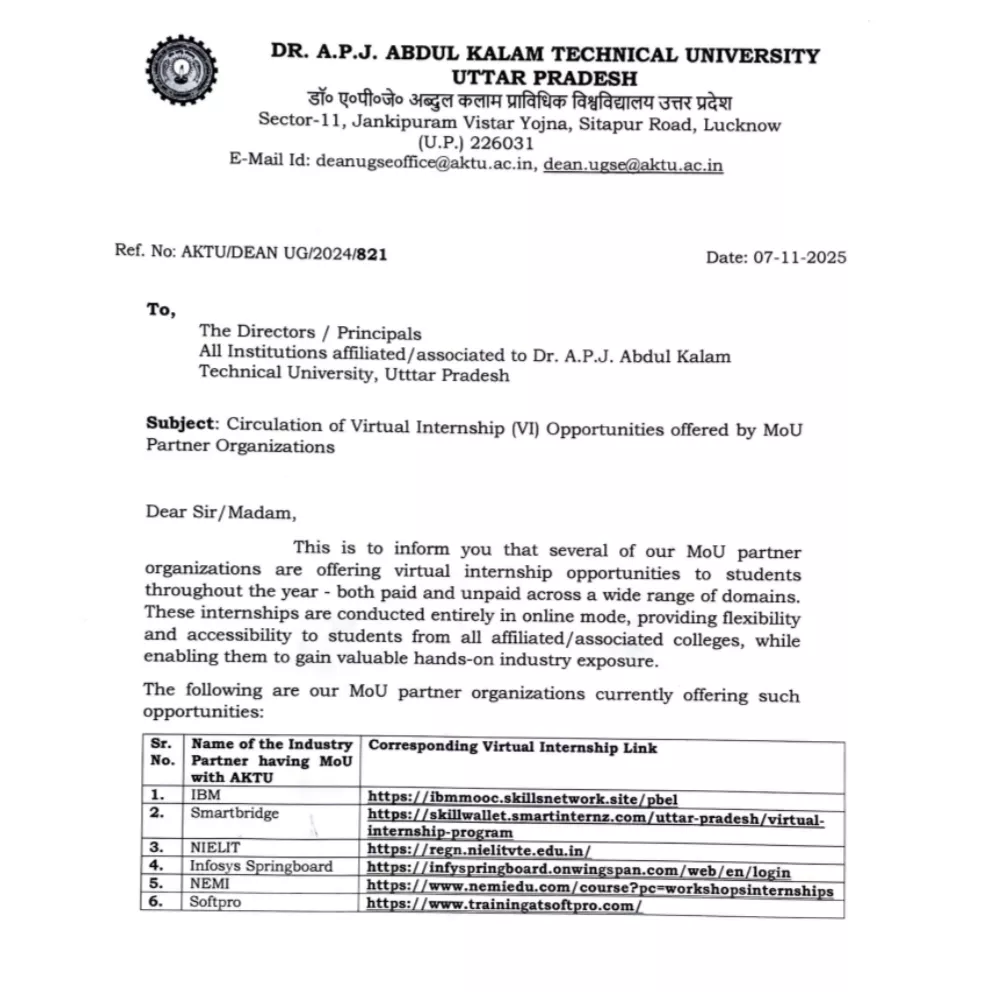
Once opened, you will see a PDF including all the official links to apply for the internships AKTU is offering in partnership with Infosys Springboard and others, etc.
Step 2: Open The Infosys Springboard Internship Application Page
In the PDF that you opened, you will see a table with all of the links to apply for the internships. Open the fourth link (Infosys) to apply for the Infosys virtual internship. You can also click here to directly visit the official application page.
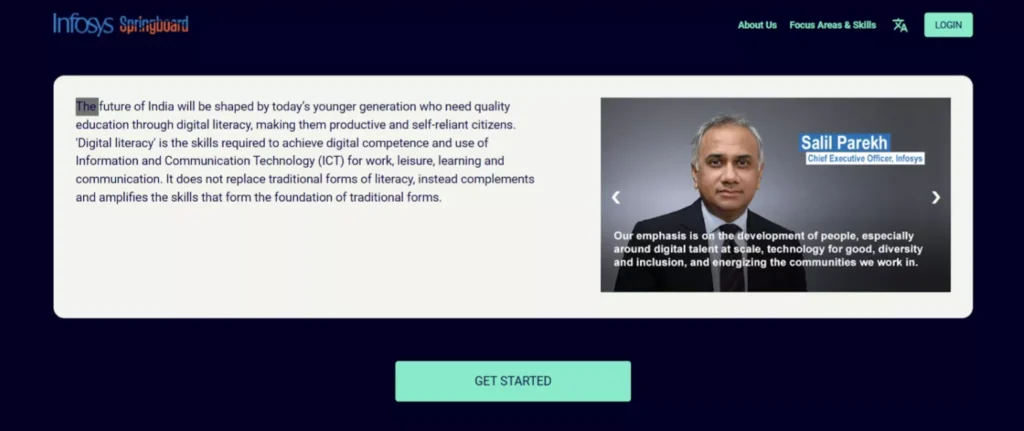
Now, click on ‘Get Started’ to proceed further.
Read More: AKTU IBM Virtual Internship 2025: A Complete Guide to IBM Virtual Internship & PBEL
Step 3: Sign-in to your account
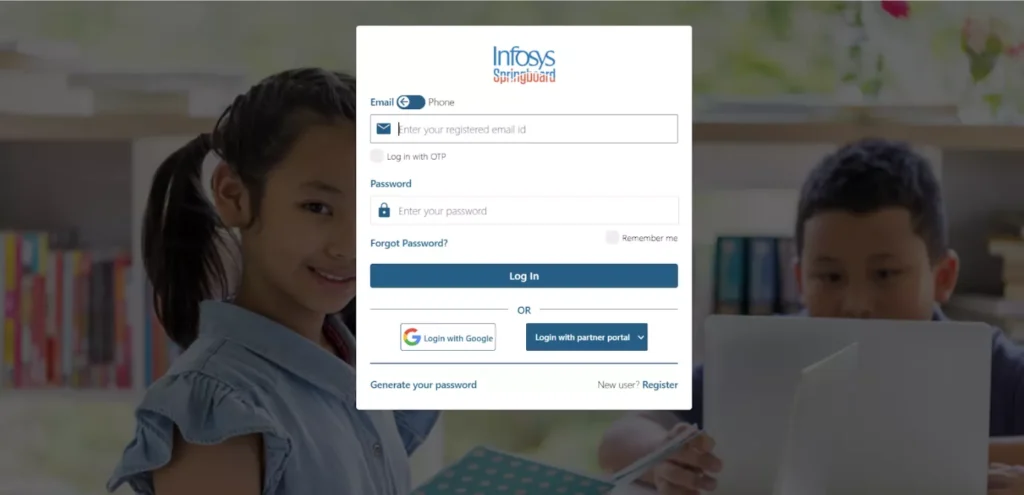
When you visit the website, you’ll notice that there are various virtual internship programs that are being offered for technical students. To have a look at them, you need to sign in or create a new account. If you already have an account, then login using your credentials.
If you are new here, then click on ‘Register’ in the bottom right corner of the pop-up message.
Step 4: Choose your preferred internship
Now you can browse the available internship tracks and select the one that matches your interests, such as AI, Web Development, Data Analytics, Cybersecurity, etc. Choose the internship domain that you have interest in and have atleast a basic knowledge of that area.
Click on ‘Apply’ for whichever internship track you find useful or interesting.
Read More: AKTU IBM Virtual Internship 2025: A Complete Guide to IBM Virtual Internship & PBEL
Step 5: Complete the Application process, Enroll now!
Finally, fill in all the required details, review the internship instructions, and click on ‘Enroll Now’ to officially join the program. These programs are completely free so you don’t have to pay any fee, you can simply start the internship by enrolling for it.
Why AKTU Students Should Apply For The Infosys Internship?
Check out why the Infosys internship is extremely beneficial for students:
- Completely free
- Recognised by top recruiters
- Powered by the brand value of Infosys
- Flexible timing, so it is ideal for students with classes
- Strong resume value
- Builds both technical and soft skills
- Provides real project experience
- Helps in placements, internships, and skill exams
Specially for AKTU students, it’s a zero-cost, high-value opportunity.
Upskill With Pregrad🚀
To perform better in the Infosys internship, you can upskill beforehand using Pregrad, where you get
- Quick courses on Python, SQL, DSA, AI, Web Development
- Beginner-friendly projects to boost confidence
- Soft-skills modules for presentations & interviews
- Placement-oriented explanations
- Internship & career blogs to guide your journey
Combining Infosys Internship + Pregrad gives you an edge in projects, assessments, and future placements.
Enter the code correctly and click on ‘Verify Account’.
| Check more Related Opportunities available! | |
| AKTU Technology Internship by SkillWallet | AKTU Virtual Internship 2025: For Freshers |
| AKTU IBM Virtual Internship 2025 | AICTE Python Full Stack Developer Internship |
FAQs on Infosys Springboard Internship
Q1. Is the Infosys Springboard internship free?
Ans: Yes, it is completely free for all students. You don’t have to pay any amount to join the virtual internship program by Infosys.
Q2. Who can apply?
Ans: Any student from AKTU or other universities (technical or non-technical) can apply for this Infosys internship.
Q3. Is it offline or online?
Ans: It is a virtual internship program, where you will get guided lessons and modules and you have to complete the modules, attend lectures, and submit the required assignments and projects in order to get a recognised certificate.
Q4. Will I have to maintain my attendance?
Ans: You can use the forgot password button or getting your email ID with others.