

Free AI Video Generator on ChatGPT can help you create AI videos, but not the way you think. This blog shows you exactly how to use ChatGPT for AI video creation, step-by-step, plus the best free AI video generator tools that work with it.
ChatGPT doesn’t create videos directly. You can’t type a prompt into ChatGPT and get a finished video. But here’s what most people don’t realize: ChatGPT is one of the most powerful tools you can use for AI video creation, just not in the way you might expect.
In this guide, we’ll break down how to use ChatGPT for AI video creation from start to finish. You’ll learn the step-by-step process, see real examples you can try yourself, discover the best free ai video generator options that work with ChatGPT, and get practical workflows you can use today.
If you’re a student creating presentation videos, a professional building content for work, or someone exploring ai text to video generator free options for personal projects, this guide will show you how to combine ChatGPT with video with ai tools to create content efficiently.
Let’s start with understanding what ChatGPT can actually do for video creation.
Table of Contents
What Can ChatGPT Do for AI Video Creation?
ChatGPT can’t generate a finished AI video on its own, but it plays a crucial role in almost every step before the visuals are created. Think of it as the brain behind the video.
When people talk about ChatGPT video, what they’re really referring to is how ChatGPT powers the thinking, planning, and writing that make video with AI tools work smoothly. Here’s what ChatGPT actually helps you do.
First, ChatGPT is excellent at writing video scripts. It doesn’t matter if you’re creating a short explainer, a social media clip, a presentation video, or a full YouTube narration, ChatGPT can turn a simple idea into a structured script that flows naturally.

This is especially useful when you’re feeding text into an ai text to video generator free tool, where clear, well-paced writing makes a huge difference in the final output.
Next, ChatGPT helps you generate strong prompts for any free ai video generator. Most free AI video generator platforms rely heavily on prompts. The better your prompt, the better your ai video looks. ChatGPT helps you describe scenes, actions, tone, camera style, and pacing in a way that ai video creation tools actually understand.
ChatGPT is also great at planning your video before you ever open an ai video generator app. It can break your video into scenes, suggest transitions, recommend visual styles, and even match visuals to each line of your script.
Another underrated strength is idea generation. If you’re unsure about what kind of ai video to create, ChatGPT can suggest content angles, hooks, video formats, and creative concepts based on your goal.
This is useful if you’re making educational content, marketing videos, or simple personal projects using video with ai tools.

Finally, ChatGPT helps you refine and improve your content. You can ask it to shorten a script, make it more conversational, adjust the tone, or optimize it for a specific ai video creation platform. Instead of guessing what will work, you can fine-tune everything before generating the visuals.
In short, ChatGPT doesn’t replace an ai video generator, but it makes every free ai video generator work better. When you combine ChatGPT with the right ai video generator free tools, creating high-quality AI videos becomes faster, clearer, and far more efficient.
Read More: Codex AI on ChatGPT Premium 2026: Double Your Coding Speed With This AI Agent For Free
How to Make an AI Video with ChatGPT (Step-by-Step)
Making an AI video with ChatGPT is more about following a smart workflow. Once you understand the process, creating video with AI becomes simple, repeatable, and surprisingly fast.
Let us learn the exact step-by-step method.
Step 1: Use ChatGPT to Clarify Your Video Idea
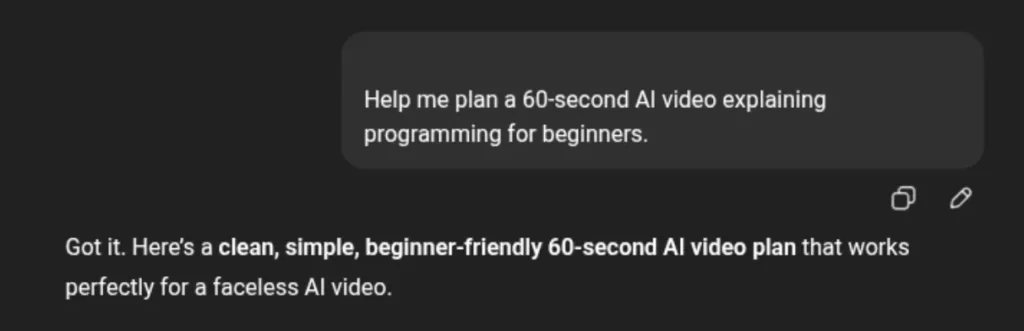
Every good ai video starts with clarity. Before touching any ai video generator free tool, you need to know what you’re creating and why.
ChatGPT helps you define:
- The goal of the video (education, marketing, presentation, social content)
- The target audience
- The ideal length and format
- The tone (professional, casual, storytelling, explainer)
You can start with something as simple as:
Help me plan a 60-second AI video explaining [topic] for beginners.
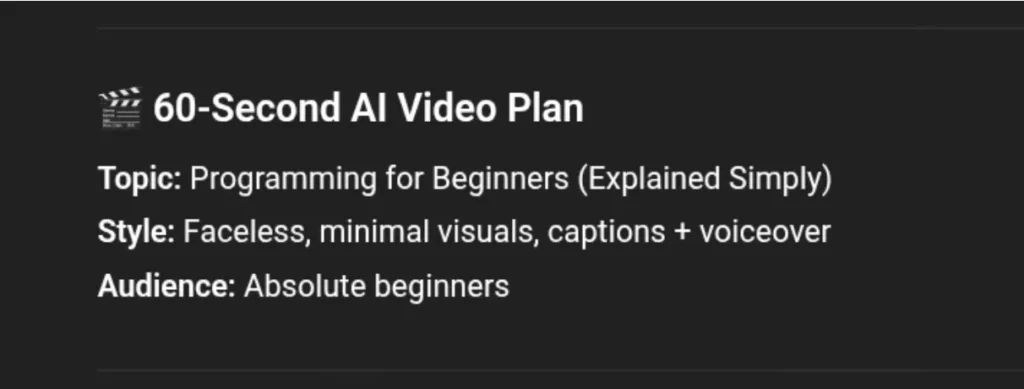
ChatGPT will generate a complete video plan for you, and you will only have to tweak it to suit your preference. This step saves you time and prevents the common mistake of generating random visuals that don’t connect.
The Result:
Step 2: Generate a Video Script with ChatGPT
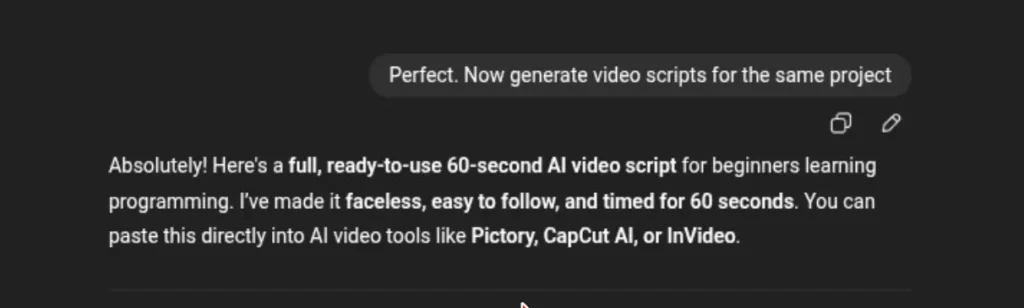
Once the ai video idea is clear, ChatGPT becomes your scriptwriter. This is where chatgpt video workflows really shines:
- Short-form scripts for social media
- Voiceover scripts for explainers
- Presentation-style narration
- Scene-by-scene dialogue for ai video creation tools
If you’re planning to use an ai text to video generator free platform, keep the script clean and direct. ChatGPT can also break the script into short lines that work better with most video AI generator tools.
You can even ask it to rewrite the script to match a specific pace or platform.
Read More: OpenAI Grove AI Talent Internship: Only 15 Candidates Can Apply!
Step 3: Turn the Script into Scene Prompts
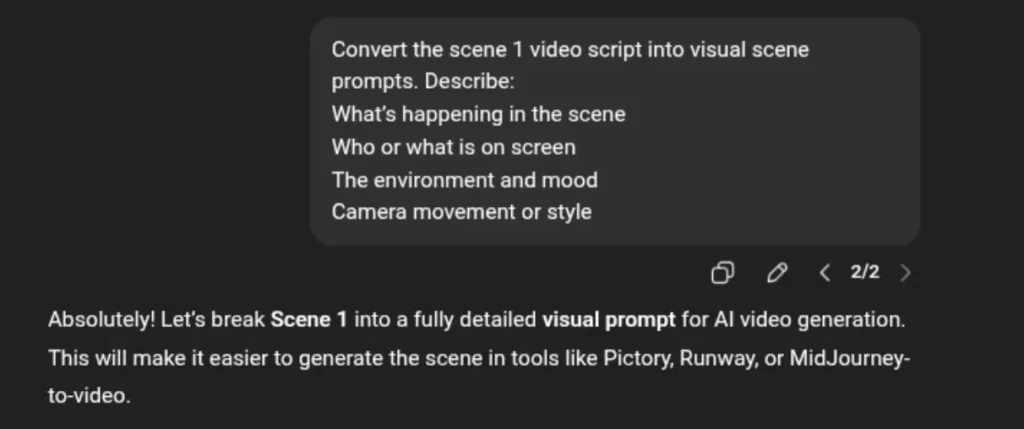
This is the step most people skip, and it’s why their ai video looks off. Instead of dropping a full script into a video ai generator, use ChatGPT to convert each part of your script into visual prompts. For example:
- What’s happening in the scene
- Who or what is on screen
- The environment and mood
- Camera movement or style
ChatGPT helps translate your words into visuals that free ai video generator tools can understand. And this is what makes your ai video creation quality improves dramatically.
Step 4: Choose a Free AI Video Generator
This is where you begin to generate the visuals.The fact remains that ChatGPT doesn’t replace an ai video generator free tool, rather it supports it. At this stage, you’ll take your script or scene prompts and input them into a video with ai platform.
Some tools focus on text-to-video, others work better with image-based scenes or avatars. If you’re exploring options like Invideo, Gemini video or other ai video generator free platforms, ChatGPT can even help you tailor prompts specifically for each tool.
Read More: Temple Device by Deepinder Goyal: Is Gravity & Aging Really Related?
Step 5: Refine, Edit, and Improve with ChatGPT
Once your ai video is generated, you’re not done yet. With ChatGPT you’ll be able to:
- Tighten the script if the video feels too long
- Improve transitions between scenes
- Rewrite sections that sound robotic
- Adjust tone for clarity or engagement
Instead of regenerating everything from scratch, you refine what you already have. This back-and-forth is what turns basic video with ai into good content.
Step 6: Export and Repurpose
After your final export, ChatGPT can still help you:
- Create captions and titles
- Write video descriptions
- Suggest repurposed versions for different platforms
- Generate short clips from long videos
In simple terms, ChatGPT handles the thinking, writing, and planning, while a free ai video generator handles the visuals. When you combine both, making AI videos becomes efficient.
Read More: ChatGPT App Store 2026: Get All Your Favorite Applications on ChatGPT Itself Now!
Best Free AI Video Generator Tools That Work with ChatGPT
Now that you’ve understood how ChatGPT fits into ai video creation, the next question is: which tools actually turn your scripts and prompts into real videos?
The good news is that you don’t need expensive software to get started. There are several free ai video generator platforms which work surprisingly well when paired with ChatGPT. You only need to know what each tool is best at.
Here, we are going to talk about some of the most useful options.
1. Gemini Video (Google)

Gemini video is one of the strongest options if you’re already working inside Google’s ecosystem. While Gemini itself focuses on multimodal AI, it pairs well with ChatGPT-generated scripts and scene prompts.
You can use ChatGPT to write your script, break it into scenes, and refine the visuals, then feed that content into Gemini video tools for ai video creation. It works best for:
• Explainer videos
• Educational content
• Simple narrative videos
If you need clarity and structure more than flashy effects, Gemini video is a solid choice.
2. Grok Imagine (xAI)

Grok Imagine is xAI’s generative media tool that can create ai video content from prompts. Unlike standard chat tools, Grok Imagine focuses on visual output, making it a true FREE ai video generator rather than just an ideation assistant. ChatGPT fits neatly into this workflow when you use it to:
- Write clean video scripts
- Break content into scene-level prompts
- Refine descriptions for motion, tone, and pacing
Then you feed those prompts into Grok Imagine to generate video with AI. It’s especially useful for:
- Short-form AI videos
- Concept visuals and animations
- Creative and experimental ai video creation
If you want to explore newer, evolving free video ai generator tools, Grok Imagine is worth testing.
3. Pictory (Free Plan)

Pictory is a popular ai text to video generator free option, especially for beginners. It takes scripts and automatically matches them with stock visuals, making it easy to create video with ai without much technical setup.
ChatGPT works perfectly here.
You generate a clean script, simplify it into short lines, and let Pictory handle the visuals. It’s ideal for:
- Short marketing videos
- Social media clips
- Blog-to-video content
The free plan has limits, but it’s more than enough to test your chatgpt video workflow.
4. InVideo AI (Free Version)

InVideo AI is another strong video ai generator that accepts text prompts and scripts. What makes it useful is how flexible it is with editing. You can use ChatGPT to:
- Write the initial script
- Suggest scene changes
- Improve voiceover pacing
- Rewrite sections that feel off
Then apply those updates directly inside InVideo. It’s a good option for people who want more control during ai video creation, even on a free plan.
5. Lumen5 (Free Tier)
Lumen5 focuses on turning text into engaging visuals quickly. It works best when your script is already structured, which is where ChatGPT helps the most.
With a well-prepared script from ChatGPT, Lumen5 can produce clean, professional-looking ai video content for:
- LinkedIn posts
- Brand storytelling
- Educational summaries
If you’re experimenting with Free ai video generator tools for content marketing, this is an easy starting point.
6. Runway (Free Access)

Runway is more advanced and creative compared to most free ai video generator tools. It’s better suited for visual experimentation rather than straight explainer videos. With ChatGPT, you can:
- Write detailed visual prompts
- Describe scenes creatively
- Plan complex sequences
If you want to push creative boundaries with video with ai, Runway is worth exploring, even on its limited free access.
How To Choose The Right AI Video Tool?
There’s no particular best ai video generator free option for everyone. The right choice depends on what you’re creating.
- If you want simple and fast, go with an ai text to video generator free tool like Pictory or Lumen5.
- If you want flexibility and editing control, InVideo AI is a strong pick.
- If you’re experimenting or creating visually rich ai video content, Runway stands out.
- And if you prefer a clean, Google-style workflow, Gemini video fits nicely.
The common thread across all of them is this: ChatGPT makes every one of these tools easier to use. It sharpens your ideas, improves your scripts, and gives you better prompts, which directly leads to better ai video results.
Read more: Is ChatGPT No Longer Generating AI Images 2026?
Common Mistakes People Make When Creating AI Videos with ChatGPT
ChatGPT makes ai video creation easier, but it doesn’t magically fix poor planning or unclear ideas. Most disappointing ai video results don’t come from bad tools, they come from a few common mistakes that are easy to avoid once you know what to look for.
Let us take a look at these mistakes:
1. Treating ChatGPT Like a Video Generator
ChatGPT does not generate finished videos. You can’t ask it to “make an ai video” and expect visuals to appear. What ChatGPT does is to support the process, not the final render. When people misunderstand this, they end up frustrated and assume chatgpt video workflows don’t work.
The moment you see ChatGPT as the planning and scripting engine behind video with ai tools, everything starts to click.
2. Skipping the Script and Going Straight to Visuals
Another mistake is jumping directly into a free ai video generator without a solid script. Most video ai generator tools depend heavily on text input. If your script is vague, messy, or too long, the visuals will reflect that.
ChatGPT helps you create a clear, structured script that ai text to video generator free platforms can actually work with. Skipping this step almost always leads to awkward pacing and random visuals.
3. Using One Giant Prompt for the Entire Video
Many beginners paste an entire script into a video ai generator and hope for the best. This usually results in inconsistent scenes and poor storytelling. AI video creation works better when the content is broken into smaller scenes.
Read More: ChatGPT New Feature: Try This Temporary Chat Feature On ChatGPT & Google Gemini, Latest Update 2025
4. Ignoring Tool Limitations
Not all ai video generator free tools are built the same. Some tools are better for short videos, while others handle longer content. Some work well with text-based input, and others rely more on visuals. Ignoring these limitations often leads to disappointment.
ChatGPT can help you adapt your script and prompts to match the strengths of each tool. It doesn’t matter if you’re using Gemini video, a basic ai text to video generator free platform, or a more creative video with ai tool.
5. Expecting Perfect Results on the First Try
AI video creation is rarely perfect on the first generation. A lot of people give up after one attempt, and quickly assume that the tool doesn’t work. In reality, they only need to refine and keep going.
ChatGPT makes this easier by helping you tweak scripts, adjust tone, shorten scenes, and improve on clarity without starting over.
Read More: 5 Highest Paying AI Jobs 2026: Prepare for Your Next Career In AI Based Jobs
6. Forgetting the Human Touch
One final mistake is leaving everything exactly as the AI outputs it. Even when using a free ai video generator, adding a bit of human judgment makes a big difference.
While ChatGPT can help you make your script more conversational, and simplify complex ideas, it works best when you support it with your message, and not allowing it to replace your voice entirely.
Avoiding these mistakes alone can dramatically improve your chatgpt video workflow. Once you understand how to guide both ChatGPT and your chosen video ai generator, creating quality AI videos becomes far less frustrating and much more rewarding.
Upskill with pregrad🚀
Pregrad is a career accelerator and upskilling platform designed to help students gain real-world skills and launch their careers before graduation.
At pregrad, you’ll learn industry‑aligned, mentor‑led programs in fields like AI/ML, data science, digital marketing, cybersecurity and more.
Learners work on hands‑on projects, attend live sessions with industry professionals, and earn recognised credentials that boost credibility with recruiters.
Pregrad also connects you with a broader career network and opportunities to accelerate your job search and career prospects.
Join pregrad today and start your career before you graduate!
Free AI Video Generator with ChatGPT FAQS
Q: Can I create AI videos with ChatGPT?
Ans: ChatGPT is not a free ai video generator as it cannot generate finished videos on its own but can help you plan scripts, storyboards, and AI prompts for video tools.
Q: What’s the best free AI video generator to use with ChatGPT?
Ans: Tools like Pictory, Gemini video, InVideo, or Grok Imagine work well with ChatGPT’s scripts and prompts.
Q: How does ChatGPT help in AI video creation?
Ans: It helps by writing scripts, generating storyboards, creating captions, and suggesting AI image/video for your scenes.
Q: Is it free to make videos with AI tools recommended here?
Answer: Most offer free tiers or trials, though some features may be limited. You can combine free AI video generators with ChatGPT for fully functional videos.
Q: Do I need technical skills to create AI videos with ChatGPT?
Answer: No. You just need to follow the script and prompts. The AI video tools handle the rest.