

ChatGPT now has an app store packed with your favorite applications for writing, coding, design, research, and productivity. Learn how to explore and use ChatGPT App Store in this guide.
Nobody saw ChatGPT becoming more interesting, but yeah, it just did. What used to be a simple chat tool is now like a full workspace. And the reason is simple: there’s now a ChatGPT App Store.
Yes, an App Store inside ChatGPT itself.
Instead of jumping between different apps for writing, coding, research, design, or productivity, you can now access specialized tools right where you already work. If you use ChatGPT regularly, you’ll easily agree this is a game changer.
The chatgpt app store makes it easier to get things done faster, smarter, and with less friction. If you’re writing content, fixing code, designing, researching topics, or trying to stay organized, there’s likely a chatgpt app built for exactly that.
In this guide, we’ll break down what the ChatGPT App Store is, how it works, and how you can start using it today.
What Is the ChatGPT App Store?
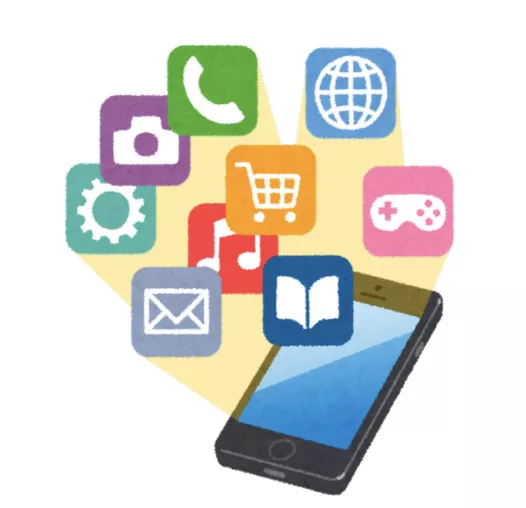
The ChatGPT app store is basically a booming marketplace in 2026 which consists of specialized AI tools that live inside ChatGPT. You don’t download anything, and you don’t need to leave the platform. Everything happens right inside the app where you’re already working.
Think of it this way. Regular ChatGPT does a lot of things pretty well. But the chatgpt app store is full of tools designed to do one specific thing really well:
- If you need help writing blog posts with a specific tone, there’s an app for that.
- If you want something to review and fix your code, there’s one for that too.
- If you’re looking for a research assistant that can pull and organize information quickly, there’s also a chatgpt ai app for that.
These custom ChatGPT apps are called GPTs, and they’re available in the ChatGPT app store. Some are created by OpenAI itself, while others come from third-party developers and companies. Some are free, yes, free chat gpt apps, while some need a ChatGPT Plus subscription. But the variety is huge.
The best part is, you don’t need to explain what you need every time you open ChatGPT. All you need to do is pick the right app, and it already understands the job. It knows the context and the format.
Instead of retyping instructions or setting up prompts from scratch, you just tell it what to do. The chat gpt app store gives you ready-made tools that work instantly.
What Are GPTs?
GPTs are the applications available on ChatGPT web and app interface. Just very similar to what you get on App Store (Apple/macOS) and Play Store (Android).
You can get access to various niches of applications including gaming, marketing, technicals, creativity, and much more.
| GPTs == Digital Apps |
- You can easily integrate these applications based on your usage and boost your productivity by 100x times.
- The GPTs are going to cover a huge part of the market in the onset of 2026. Make sure you check the App store by ChatGPT.
What Can You Do With The ChatGPT App Store?
The chatgpt app store genuinely expands what you can do with ChatGPT in ways that weren’t possible before. Let us get a breakdown of how it’s actually useful to you:
1. Writing and Content Creation
If you write regularly, there are apps that help you draft blog posts, generate social media captions, or even create entire content calendars. Instead of coaching ChatGPT on your style every time, you pick an app that already understands the concept.
Some apps focus on SEO optimization, others help with storytelling structure. A few are built specifically for academic writing or technical documentation. But whatever you’re writing, there’s probably a chatgpt ai app designed to make it faster and better.
Read More: Pregrad New Year Sales On Course 2026: Get Huge Offers Up to 70% On Pregrad Courses This Week!
2. Coding and Development
Developers use the chat gpt app store for debugging, code review, generating boilerplate code, and explaining complex functions. There are apps built around specific languages like Python, JavaScript, or SQL. Some focus on frameworks like React or Django.
The helpful part is that these apps understand coding context better than general ChatGPT, so they don’t just spit out code. They explain what it does, suggest improvements, and help you spot bugs before they become problems.
Read More: ChatGPT Age Restriction: Is ChatGPT 5.2 Restricting Under Age Users (Below 18)?
3. Research and Learning
If you’re a student or researcher, there are apps that help you organize information, summarize articles, format citations, and even generate study guides. Some pull data from multiple sources and present it in a structured way.
These research-focused chatgpt apps save time on the boring parts so you can focus on actually understanding and analyzing what you’re learning.
Read More: Is ChatGPT No Longer Generating AI Images? What is the Current Update?
4. Design and Creativity
If you need design ideas or logo concepts, there are apps for that. Some help you brainstorm creative projects, others generate mockups or wireframes based on your descriptions.
While ChatGPT itself can suggest ideas, design-specific apps in the chatgpt appstore push those suggestions further and format them in ways that are immediately useful.
5. Productivity and Organization
This is where things get practical. Apps in the free chat gpt store can help you manage tasks, create meeting agendas, draft emails, organize notes, and plan projects. Some integrate with tools you already use, so information flows directly into your workflow.
Instead of using ChatGPT as a glorified notepad, productivity apps turn it into an actual assistant that keeps you on track.
Read More: Is Accenture Discovery Internship 2026 Open Now?: Best Guide [December Update!]
6. Business and Professional Tools
For professionals, there are apps built around sales outreach, customer support templates, financial analysis, marketing strategy, and data interpretation. They’re formatted for specific business use cases.
If you work in a specific industry, chances are someone has built a chatgpt app that understands the workflows, and output formats you need.
It is very simple. The chatgpt web app went from being just a chatbot to being a platform. And now, instead of adapting ChatGPT to fit your needs every time, you just find the tool that already does what you’re trying to do inside chatgpt itself.
How to Access and Use the ChatGPT App Store?
Getting to the chatgpt app store is straightforward. You don’t need to download anything or set up a separate account. If you already use ChatGPT, you’re halfway there.
Step 1: Open ChatGPT
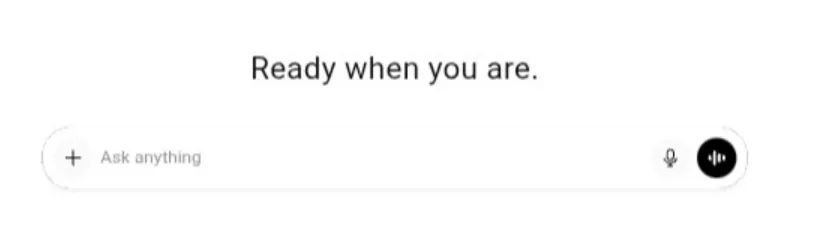
Go to chat.openai.com or open the ChatGPT mobile app. Log in with your account. If you don’t have one yet, signing up is free and takes less than a minute.
Step 2: Look for the App Store Option
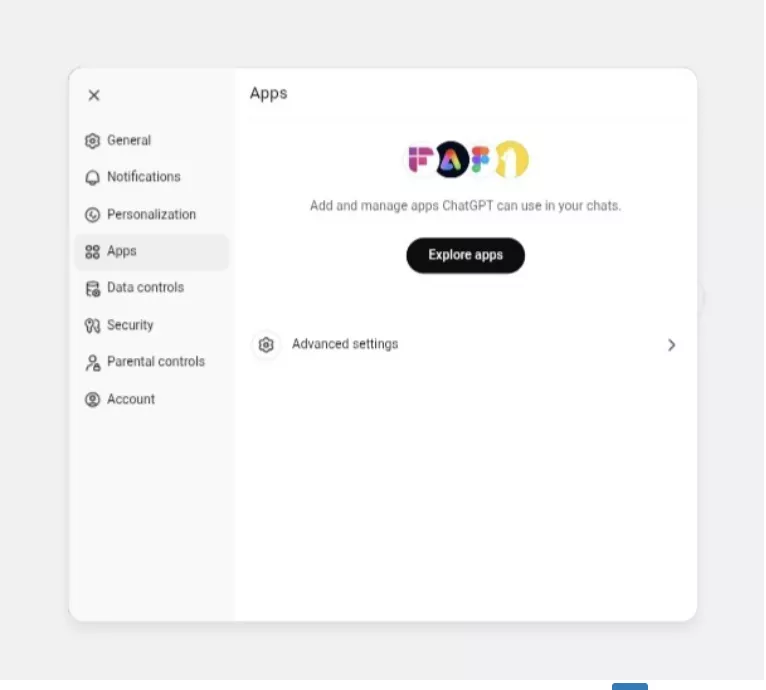
Once you’re in, look for the “Explore GPTs” or “App Store” option. It’s usually in the sidebar or navigation menu. The exact placement depends on whether you’re using the chatgpt web app or the mobile version, but it’s easy to spot.
Step 3: Browse or Search
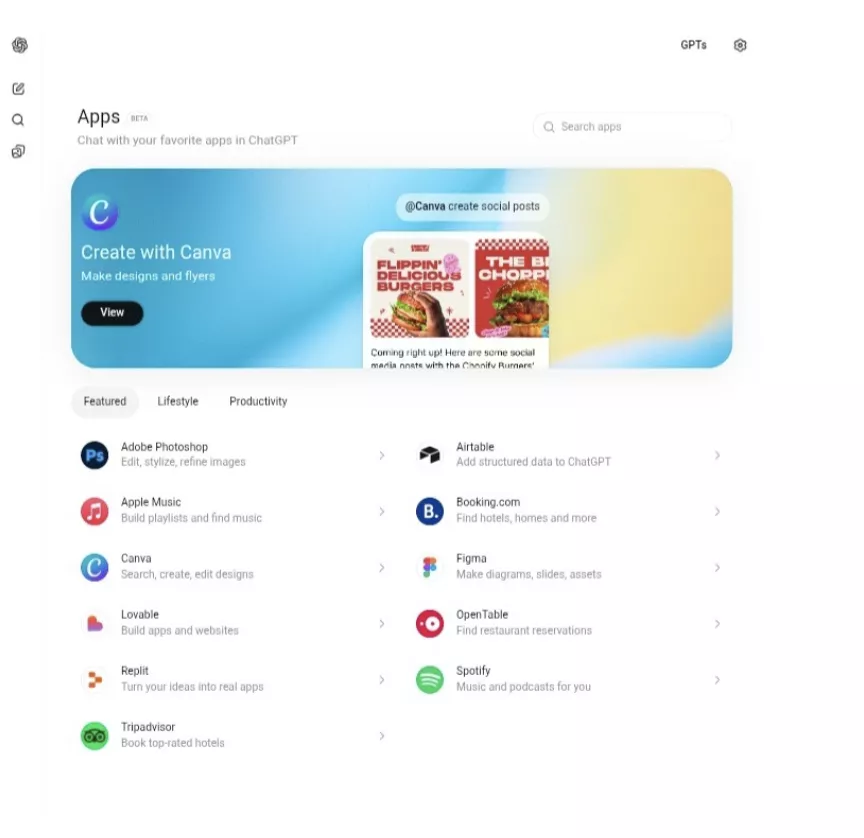
Now you’re in the store. You can browse by category; writing, productivity, coding, education, lifestyle, or search for something specific. If you know what you need, just type it in. If you’re exploring, the categories make it easy to discover useful tools.
Read More: ChatGPT OpenAI: Is OpenAI Launching ChatGPT-5? New AI Model Coming this Summer!
Step 4: Select an App of Your Choice
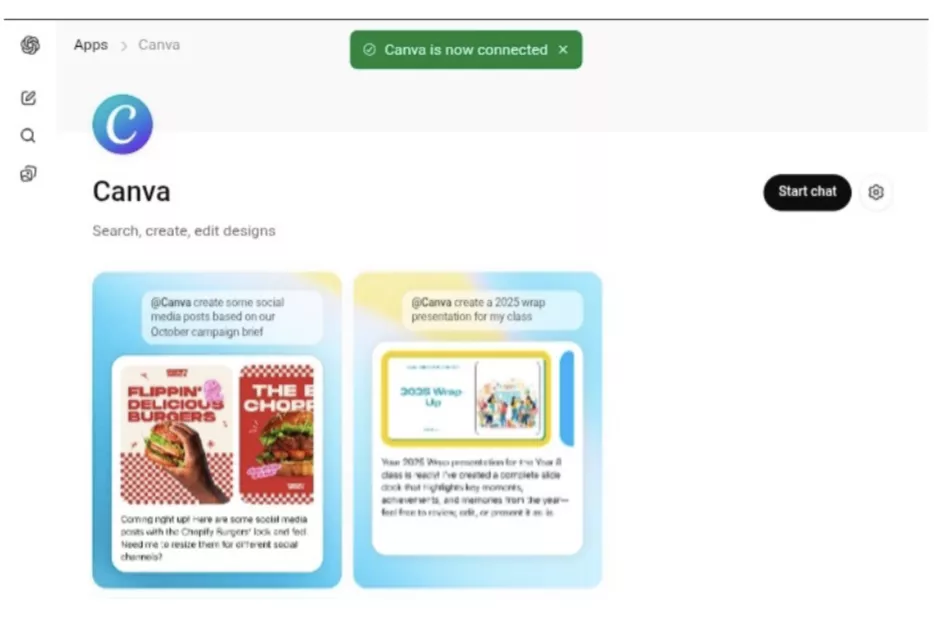
Click on any chatgpt app that looks interesting. You’ll see a description of what it does, who built it, and whether it’s free or requires ChatGPT Plus. Some apps are completely free with a free chat gpt account. Others need a paid subscription.
Step 5: Start Using It
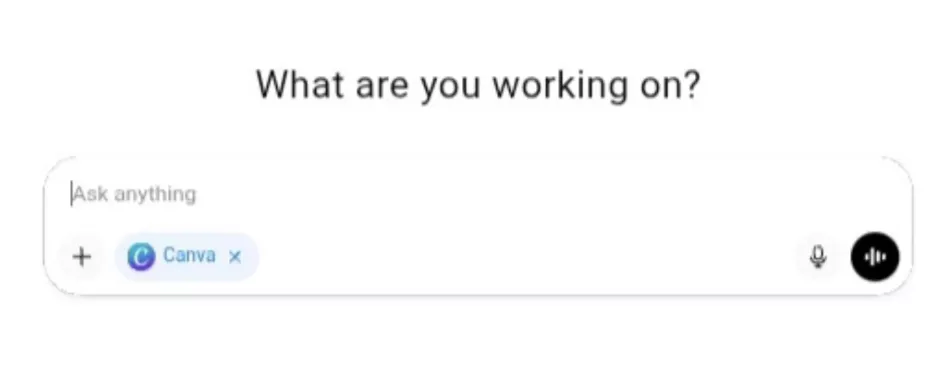
Once you select an app, it opens in a chat window just like regular ChatGPT. The difference is that this version is specialized for the task you chose. You can start asking questions, giving instructions, or working on whatever you need right away.
Switching Between Apps: Best Feature For Multitasking
You can switch between different ChatGPT apps anytime. If you’re writing in one app and need to switch to a coding assistant, just go back to the store and select a different one. Your conversations stay separate, so you won’t mix up contexts.
This significantly solves a lot of problem for Developers and other professionals who are doing a lot of multitasking.
Using the Free ChatGPT Version!
If you’re on the free plan, you still get access to the ChatGPT app store. You won’t have access to every single app because some are Plus-only. But there are plenty of free options that work well.
You can explore, test different tools, and see what fits your needs before deciding if you want to upgrade.
Best ChatGPT Apps to Try Right Now
The chatgpt app store has hundreds of real-world apps from companies you already know and use. Here are some of the most useful ones to get you started.
1. For Creative Work and Design
Creators can get an upper hand using the ChatGPT appstore as they get accessibility to top applications like Canva, Figma, Adobe, and much more.
Canva
You can turn your ideas into slide decks, social media posts, posters, and presentations without leaving ChatGPT. Just describe what you need, and Canva generates design options you can edit and customize to your preference.
Figma
You can create diagrams, flowcharts, and wireframes directly in chat. This chatgpt ai app helps you visualize complex ideas and workflows quickly, making it perfect for brainstorming sessions.
Adobe Photoshop
Edit images and create visual content using natural language prompts. You can request specific edits, adjustments, or creative effects without opening the full Photoshop app.
2. For Productivity and Work
If you are from an IT or tech division, then you will get everything at the ChatGPT app store like Slack, Notion, Asana, Microsoft Teams, and more.
Slack
You can summarize threads, generate recaps of conversations, and draft responses to messages. The chat gpt ai app pulls context from your Slack workspace so you can stay on top of communication without switching tabs. Interesting right?
Asana
This helps you check task progress, generate status reports, and update project information. You can ask about specific projects and get instant updates on what your team is working on without switching tabs.
Notion
Access and organize your notes, documents, and databases. This chatgpt app lets you search your Notion workspace and pull relevant information into your ChatGPT conversations.
Microsoft Teams
This is similar to Slack, you can summarize meetings, catch up on conversations, and manage communication across your Teams workspace, all in the chatgpt app.
Google Drive / Dropbox / Box
You can connect your cloud storage to search files, reference documents, and pull information from your stored content without leaving the chatgpt web app.
3. For Travel and Lifestyle
If you are someone who plans travels frequently then you can now do it easily with your favorite apps on ChatGPT app store.
Expedia
Search for flights and hotels based on your dates, budget, and preferences. You can compare options and get recommendations without opening multiple travel sites.
Booking.com
Find accommodations that match your needs. Specify your budget, location preferences, and travel dates, and the app shows you relevant options.
Zillow
Browse real estate listings, check home prices, and explore neighborhoods. If you’re house hunting or just curious about property values in different areas, you’ll mostly enjoy this.
Uber / Uber Eats / DoorDash
You can order food, groceries, or rides directly through ChatGPT. These chatgpt apps connect to your accounts so you can place orders conversationally.
OpenTable / TheFork
You can make restaurant reservations by describing what you’re looking for; cuisine type, location, time, and party size.
4. For Music and Entertainment
If you are looking for a music recommendation, playlist based on your current moods and anything. Instead of searching on different platforms, you can use ChatGPT app store to get your favorite applications and do it with simple prompts or voice based search.
Spotify
Create playlists for specific moods, events, or activities. Just describe what kind of music you want, and Spotify will generate a playlist that shows up in your account.
Apple Music
Similar to Spotify, you can build custom playlists and discover new music based on your preferences and listening history.
5. For Learning and Education
You can easily find plenty of resources, ebooks, and learning materials online on ChatGPT itself.
Coursera
Discover online courses that match your skill level and interests. You can compare the options by rating, duration, and cost before enrolling.
Khan Academy
Get help with homework, study specific topics, or explore new subjects with structured learning resources.
6. For Sales and Marketing
If you are a sales and marketing professional, then ChatGPT is all you need to build a campaign with your favorite app, search for stats, trends, and much more.
Klaviyo
This helps you track campaign performance, analyze email marketing metrics, and get insights on customer engagement. Marketers can skip manual reporting and get instant analysis of their campaigns.
Mailchimp
Manage email campaigns, check performance stats, and draft marketing content without logging into the full platform.
Read More: Gen-AI Powered Tata Virtual Internship : Certificates to All Applicants
7. For Developers and IT
Technical professionals can get a lot from their favorite applications on ChatGPT store. They can seek guidance, look for frameworks, and much more.
GitLab Issues / Azure Boards
With this you can track bugs, manage project issues, and check development progress directly in ChatGPT.
Hugging Face
Access AI models, datasets, and machine learning resources for development projects.
8. For Business and Finance
If you are someone who is running a business, then ChatGPT store is something you will need to keep very close.
Stripe
With this you can check payment data, transaction history, and business metrics without leaving your conversation.
Ramp
Manage expenses, track spending, and review financial data.
These are just some of the apps available. Download chat gpt app on your phone or use the web version at chatgpt.com to explore the full directory and connect the tools that fit your workflow.
Do You Need ChatGPT Plus to Use These Apps?
Some chatgpt apps work perfectly fine with a free chat gpt account, while others require a ChatGPT Plus subscription. And a few offer limited features on the free plan but unlock more functionality if you upgrade.
What You Get With Free ChatGPT?
If you’re using the chatgpt app free version, you still get access to the app store. You can browse everything, see what’s available, and try apps that don’t require a paid plan.
Many productivity apps, writing assistants, and research tools work on the free tier. You won’t have access to every single feature, but you can still do a lot without paying.
The free version also lets you test apps before committing to a subscription. If you’re not sure whether the chatgpt appstore is worth upgrading for, you can explore first and decide later.
What ChatGPT Plus Unlocks?
With ChatGPT Plus, you get faster response times, priority access during high-traffic periods, and full access to apps that require a paid subscription.
Some of the more advanced apps, especially ones that connect to premium third-party services like Canva Pro, Spotify Premium, or business tools like Asana and Slack work better or unlock additional features with Plus.
If you use ChatGPT regularly for work, school, or personal projects, Plus is usually worth it. The speed difference alone makes tasks faster, and having unrestricted access to the chat gpt ai app library means you’re not hitting limits when you need something urgently.
How to Know Before You Try?
When you click on any app in the chatgpt appstore, it tells you upfront whether it’s free or requires Plus. You won’t accidentally start using something and hit a paywall halfway through.
If an app needs Plus and you don’t have it, ChatGPT will let you know. You can either upgrade or look for a similar app that works on the free plan.
Overall, you don’t need ChatGPT Plus to use the app store. But if you want full access to every app and faster performance, upgrading makes sense.
Why You Should Start Using the ChatGPT App Store Today?
If you still have doubts about exploring the chatgpt appstore, here’s why it’s worth your time.
1. It Saves You From Repeating Yourself
Before the chat gpt app store existed, you had to explain what you needed every single time you opened ChatGPT. You basically had to set the context, describe the format, and clarify the tone. Over and over again.
But now with the ChatGPT appstore, you’ll just pick an app that already understands the task. It knows what you’re trying to do, so you skip straight to work. That alone saves hours over time.
2. It Makes ChatGPT Actually Useful for Specific Jobs
General ChatGPT is good at a lot of things. But specialized chatgpt apps are great at specific things. If you’re coding, writing, researching, or managing projects, using an app built for that exact purpose just works better. You will get better outputs, fewer adjustments, and less frustration.
3. You Stop Switching Between Apps
Instead of jumping between ChatGPT, Canva, Asana, Spotify, Google Drive, and ten other tools, you can handle a lot of it in one place.
If you need to draft an email, check your tasks, create a design, and search your files, you can do all of that without leaving the chat. It’s faster, cleaner, and it keeps you focused.
4. It’s Free to Explore
You don’t need to pay anything to check out the chatgpt app free options. All you have to do is browse the store, try a few apps, and see what fits your workflow. If it helps, great. If not, you haven’t lost anything.
Most people don’t realize how many useful tools are already sitting in the appstore, completely free to use. You just have to look.
5. It Keeps Getting Better
OpenAI keeps adding more apps and improving the ones that already exist. What’s available today is just the beginning. The more the chat gpt appstore grows, the more useful it becomes.
Starting now means you’re ahead of the curve. You’ll know what works, what doesn’t, and how to use these tools effectively while others are still figuring out they exist.
6. The Learning Curve Is Almost Zero
You already know how to use ChatGPT, so using apps in the store is the exact same experience. You chat, ask questions, and you get results. There’s no new interface to learn, no setup process, and no technical hurdles.
The chatgpt ai app ecosystem is built to make your life easier, not more complicated. And the best time to start exploring it is right now.
Upskill With Pregrad🚀
AI tools like ChatGPT and its app store are changing how we work, learn, and solve problems. But knowing how to use these tools is just one part of staying relevant in today’s job market. If you want to build a real career in tech, you need structured learning, hands-on projects, and industry-recognized skills.
That’s where Pregrad comes in.
Pregrad helps students, freshers, and career switchers become job-ready through industry-backed courses in AI/ML, Data Science, Full Stack Development, Cybersecurity, Digital Marketing, and Business Analytics.
Once you enroll with Pregrad, you’re not just watching videos and hoping for the best, instead you’re learning through real projects, live mentorship, and practical experience that employers actually care about.
Every Pregrad course is co-created with industry professionals from companies like IBM, Microsoft, Meta, and Cisco. You learn the same tools, technologies, and workflows that real companies use every day. Plus, you earn globally recognized certifications that strengthen your resume and LinkedIn profile.
Along with structured learning, you get career support, placement assistance with 300+ hiring companies, resume and LinkedIn guidance, and access to internship and job opportunities.
If you’re interested in mastering Python, building AI models, or understanding how to leverage tools like ChatGPT in professional settings, Pregrad equips you with the skills and confidence to succeed.
Enroll now and start building the future you want.
ChatGPT App Store FAQs
Q1. Is the ChatGPT app store free to use?
Ans: Yes. You can access the chatgpt appstore with a free ChatGPT account. Some apps are completely free, while others require a ChatGPT Plus subscription. The store itself doesn’t cost anything to browse or explore.
Q2. Can I use ChatGPT apps on my phone?
Ans: Yes. The chatgpt app is available on both iOS and Android. You can download chat gpt app from the App Store or Google Play, log in, and access the app store directly from your phone. Everything works the same way as it does on desktop.
Q3. Are these apps safe to use?
Ans: Yes. Apps in the chatgpt appstore come from verified developers and established companies like Canva, Spotify, Asana, and others. OpenAI reviews apps before they’re added to the store, so you’re not connecting to random or unverified tools.
Q4. Do I need to connect my accounts to use these apps?
Ans: It depends on the app. Some chatgpt apps work without any account connection. Others, like Spotify or Google Drive, need you to connect your account so they can access your data and perform actions on your behalf. You’ll always be asked for permission before any connection is made.