


Codex AI is ChatGPT Pro’s new AI coding agent that can build applications, write, debug, and explain code for you. Here’s everything you need to know about this OpenAI chatbot GPT feature and how to start using it today.
OpenAI just launched Codex, an AI coding agent built into ChatGPT Pro. If you’ve been using free chat gpt or the standard OpenAI chatGPT, this is a major upgrade that changes how you interact with code.
Codex is an AI agent that can write complete applications, debug your code, explain complex logic, refactor messy functions, and even help you learn new programming languages. It’s just like having an experienced developer working alongside you, available 24/7.
This is different from the regular online chatGPT experience. While standard ChatGPT can help with coding questions and generate code snippets, Codex AI is specifically designed as a coding agent. It understands context better, handles larger codebases, and can execute multi-step coding tasks without constant prompting.
With ChatGPT 5 rumors circulating and AI coding tools becoming more powerful, Codex represents where OpenAI is heading with specialized AI agents. Instead of one general-purpose chatbot, you’re getting tools built for specific tasks, and Codex is built specifically for developers.
In this guide, you’ll learn what Codex actually is and how it differs from standard ChatGPT, how to access and use Codex on ChatGPT Pro, step-by-step tutorials for common coding tasks, real examples and use cases from building apps to debugging, and how Codex compares to other AI coding tools.
If you’re a professional developer looking to speed up your workflow, a student learning to code, or someone exploring what this OpenAI chatbot gpt can actually do for programming, this guide will show you how to make the most of Codex AI.
Let’s start with understanding what Codex actually is.
Table of Contents
What Is Codex AI?

Codex is an AI coding agent built into ChatGPT Pro. It’s not a separate tool or platform. It’s right there inside ChatGPT Pro, designed specifically to help you with programming.
ChatGPT plus is all it takes for you to start using this AI
If you’ve used ChatGPT before for coding help, you know it can answer questions and write code snippets. But Codex does more. Regular ChatGPT answers one question at a time. You ask something, it responds, and that’s pretty much it.
Codex works like a coding partner. It understands your entire project, remembers what you’re building, handles tasks that need multiple steps, and keeps working without you having to explain everything again.
So what can Codex actually do? It writes complete applications from scratch. You tell it what you want to build, and it writes the code, organizes the files, and explains how everything fits together. It debugs your code by finding errors, figuring out what went wrong, and showing you how to fix it. You paste an error message or broken code, and Codex AI walks you through the solution.
You can use Codex in terminal, editor, and Code Review easily without spending a single penny! All you need is a ChatGPT Plus and that too is free of cost.
Codex also explains complicated code in simple English. If you’re trying to understand someone else’s work or a confusing function, it breaks everything down step by step. It can clean up messy code and make it more efficient. It helps you learn new programming languages by writing examples and explaining how things work. It even reviews your code like an experienced developer would.
Codex is built on OpenAI’s language models but trained specifically for coding. It understands programming languages, frameworks, how code works together, and what good code looks like. It’s been trained on billions of lines of code from public projects and documentation, which is why it can recognize patterns and write code that actually works.
Get ChatGPT Premium Absolutely for Free: A Complete 1 Year of Productivity and Upskilling
Before Codex, using ChatGPT for coding meant a lot of back and forth. You’d ask a question, copy some code, test it, hit an error, go back and ask again. Codex cuts through all that. All you have to do is describe what you need, and it handles the details. You show it buggy code, and it fixes it. You ask for help learning, and it teaches while you build.
This matters most when you’re learning to code, working with something unfamiliar, stuck on a tough bug, trying to build something quickly, or wanting to actually understand code instead of just copying it. The difference becomes obvious when you’re working on real projects that need multiple steps and ongoing work.
People keep talking about what’s coming next with AI models, but Codex is here now. It is OpenAI’s shift toward specialized tools that do specific things really well, rather than one tool trying to do everything. You don’t have to wait for some future update. If you have ChatGPT Pro, you can start using Codex today.
Read More: ChatGPT App Store 2026: Get All Your Favorite Applications on ChatGPT Itself Now!
Least Hallucinations Observed On Codex AI
When Codex AI was observed and tested with 192k verified samples of tokens and medium “Reasoning effor” which will be available when integrated with your IDE environment. Developers can use it to boost their tasks by a significant amount.
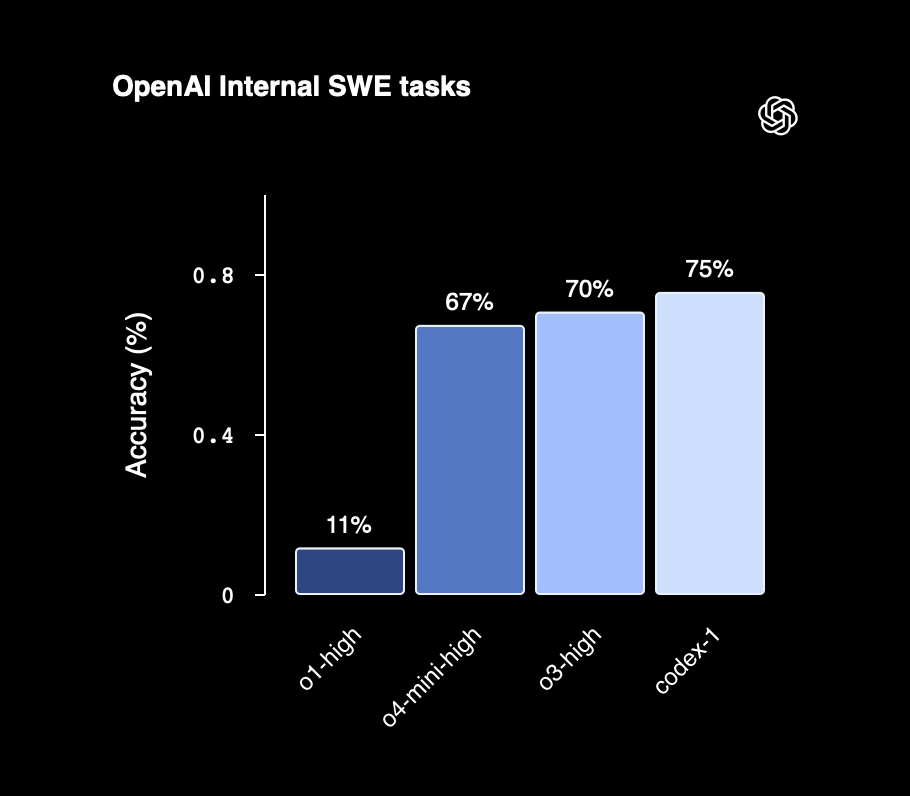

The data given here represents that when different models was tried along with other AI models like Codex it delivered highest accuracy rates which is very well suited for a development environment.
How to Access and Use Codex on ChatGPT Pro?
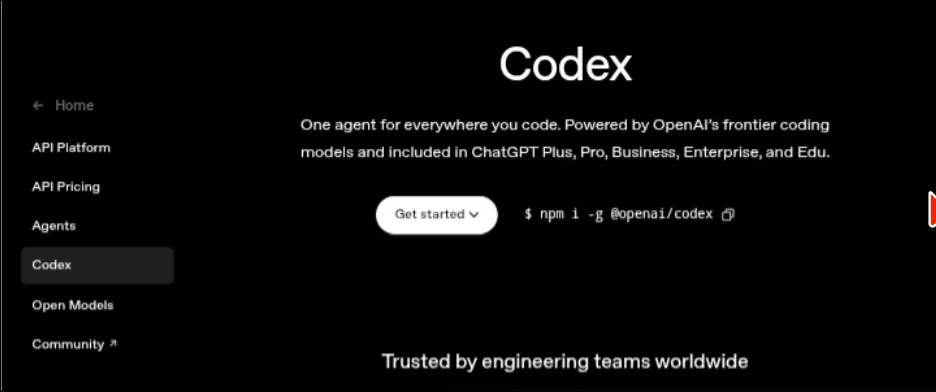
Codex is only available on ChatGPT Pro. If you’re using the free chat gpt version or ChatGPT Plus, you won’t have access to Codex yet. You need a ChatGPT Pro subscription to use it.
If you already have ChatGPT Pro, accessing Codex is straightforward. You don’t need to download anything new or set up a separate account. It’s built right into your existing ChatGPT Pro interface.
When you log into ChatGPT Pro, you’ll see different model options at the top of your chat interface. Codex appears as one of these options alongside the standard GPT models. To start using Codex, simply select it from the model dropdown menu before you begin your conversation.
Once you’ve selected Codex, you can start asking it to help with your coding tasks. The interface looks the same as regular ChatGPT, but you’re now talking to an AI specifically trained for programming.
If you want to utilize codex effectively, start by being specific about what you need. Instead of saying “help me with Python,” tell Codex AI exactly what you’re trying to do. For example, “I need a Python function that takes a list of numbers and returns only the even ones” gives Codex clear direction.
You can also share your entire project context with Codex. If you’re working on a larger application, explain what you’re building, what you’ve already done, and what you need help with next. Codex remembers this context throughout your conversation, so you don’t have to repeat yourself.
When you need to debug code, paste the problematic code directly into the chat along with any error messages you’re getting. Codex will analyze what’s wrong and suggest fixes. You can then ask follow-up questions about why the error happened or how to prevent similar issues.
If you want Codex to build something new, describe what you want in simple language. You don’t need to know the exact syntax or technical terms. You can just say something like “create a simple web page with a form that collects email addresses and stores them” and Codex will write the code for you.
As Codex generates code, it usually explains what the code does. If you need more clarification, ask. You can say “explain this function line by line” or “why did you use this approach instead of another one” and Codex will break it down further.
One useful feature is that you can iterate with Codex. If the first version of code it generates isn’t quite right, tell it what needs to change. “This works but can you make it faster?” or “Can you rewrite this using a different library?”. Codex will adjust based on your feedback.
You can also use Codex to review code you’ve already written. Paste your code and ask “what could be improved here?” or “are there any potential bugs in this code?” Codex will analyze it and suggest improvements.
For learning purposes, Codex is particularly helpful. You can ask it to write example code for concepts you’re trying to understand, then ask it to explain how that code works. This combination of seeing working code and getting explanations helps you learn faster.
The key difference between using Codex and regular online chatgpt for coding is that Codex maintains context and can handle more complex, multi-step tasks. You can have an ongoing conversation about a project, and Codex will remember what you discussed earlier in the chat.
If you’re switching between different coding tasks or projects, it’s often helpful to start a new chat for each project. This keeps the context clean and makes it easier for Codex to focus on the specific task at hand.
Remember that while Codex is powerful, it’s still a tool. You should review the code it generates, test it in your environment, and make sure it does what you need. Codex is excellent at writing working code, but you’re still responsible for understanding what the code does and ensuring it fits your specific requirements.
 |
Key Features of Codex AI and How to Use Them?
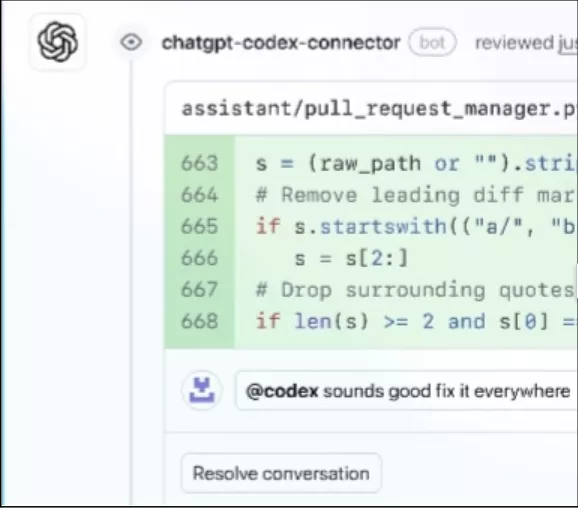
Codex comes with several features that make it more than just a code generator. Understanding these features helps you get the most out of this OpenAI chatbot gpt tool.
1. Complete App Development
The first major feature is complete application development. Codex can build entire applications from your description, not just individual functions or snippets. All you have to do is tell Codex you want to build a to-do list app with a database, user authentication, and a clean interface, and it will create all the necessary files, write the frontend and backend code, set up the database structure, and explain how everything connects.
To use this feature effectively, start with a clear project description. Explain what your app should do, who will use it, and what features it needs. Codex ai will ask clarifying questions if it needs more information, then start building. You can guide the process by asking it to focus on specific parts first or to use particular technologies you prefer.
2. Code Explanation
The code explanation feature is incredibly useful when you’re trying to understand existing code. Paste any code into Codex AI and ask it to explain what’s happening. It breaks down complex functions line by line, explains why certain approaches were used, identifies potential issues, and suggests what could be improved.
This works for code written in any major programming language. If you’re reading Python code and you’re more familiar with JavaScript, you can even ask Codex to explain the Python code in terms a JavaScript developer would understand. It adapts explanations to your level and background.
3. Debugging
Codex’s debugging capability goes beyond just fixing syntax errors. When your code isn’t working, paste it along with the error message or describe what’s going wrong. Codex analyzes the code, identifies the root cause of the problem, explains why the error is happening, provides a fixed version of the code, and suggests how to avoid similar issues in the future.
The debugging feature is particularly strong because Codex understands context. If you’re working on a larger project and one part breaks, you can show Codex ai the broken section along with related code, and it will understand how they interact.
Read More: OpenAI Grove AI Talent Internship: Only 15 Candidates Can Apply!
4. Code Refactoring
Code refactoring is another powerful feature. If you have working code that’s messy, inefficient, or hard to read, Codex AI can improve it. You only have to ask it to make the code more readable, optimize performance, follow best practices for a specific language, or restructure code to be more maintainable.
For example, if you have a long function doing too many things, ask Codex to “refactor this into smaller, focused functions.” It will break down the code logically and explain why the new structure is better.
5. Learning Feature
The learning feature makes Codex excellent for education. When you’re learning a new programming language or framework, Codex AI acts as a tutor. Ask it to write example code for specific concepts, explain how features work in that language, show you common patterns and practices, or compare approaches from languages you already know.
If you’re learning React and you know vanilla JavaScript, you can ask “show me how to create a counter component in React and explain how it’s different from doing the same thing in vanilla JavaScript.” Codex will provide both the code and the conceptual explanation.
Read More: ChatGPT 5: Breakthrough or Breakdown? Is ChatGPT Going to Survive What’s coming Next?
6. Code Review
Codex AI also has strong code review capabilities. You only need to paste your code and ask for feedback. It will point out potential bugs, suggest performance improvements, identify security concerns, and recommend better approaches. This is like having a senior developer review your work before you commit it.
7. Multi-Language Feature
The multi-language support feature means Codex works with virtually any programming language. Python, JavaScript, Java, C++, Go, Ruby, PHP, and dozens of others. You can even ask it to convert code from one language to another while explaining the differences.
8. Project Planning
For project planning, Codex AI can help before you write any code. Describe what you want to build, and ask Codex to suggest a technical architecture, recommend appropriate technologies, outline the file structure, or identify potential challenges. This planning feature helps you start projects with a solid foundation.
Read More: OpenAI Grove AI Talent Internship: Only 15 Candidates Can Apply!, Last Date to Tomorrow, January 12
9. Incremental Development
One particularly useful feature is incremental development. You don’t have to build everything at once. Start with a basic version, get it working, then ask Codex AI to add features one at a time. “Now add user authentication,” “Next, add the ability to upload images,” “Make this responsive for mobile.” Codex builds on what’s already there.
10. Documentation
The documentation feature helps you understand and document your code. Ask Codex AI to write documentation for your functions, explain how to use your code, or create README files for your projects. It generates clear, helpful documentation based on what your code actually does.
11. Easy Integration
Codex extension or CLI also integrates well with different development workflows. You can use it for quick prototypes, serious production code, learning exercises, or debugging existing projects. The versatility means it fits into however you already work.
What makes all these features powerful is that they work together. You might start by asking Codex to explain some existing code, then ask it to refactor that code, then have it add new features, then review everything for potential issues. This means you’re having a continuous development conversation where Codex AI helps throughout your entire process.
Best Practices for Using Codex Effectively
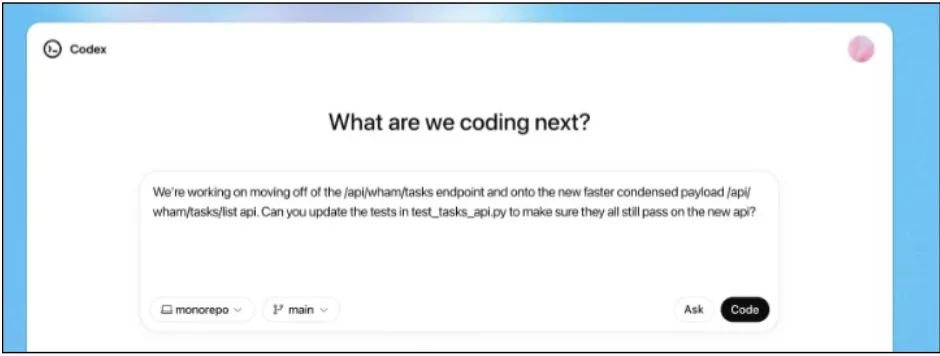
Getting the most out of Codex means knowing how to communicate with it and structure your workflow. Let us understand the best practices that make the biggest difference.
1. Be Specific with Your Requests
The more specific you are about what you need, the better Codex performs. Instead of asking “help me build a website,” say “build a landing page with a hero section, three feature cards, and a contact form using HTML, CSS, and vanilla JavaScript.” Specific requests like this gives Codex clear direction and reduce the back-and-forth needed to get what you want.
When you’re debugging, don’t just paste code and say “this doesn’t work.” Explain what you expected to happen, what’s actually happening, and include any error messages. This context helps Codex identify the problem faster.
2. Provide Context Early
At the start of your conversation, give Codex the full picture. Explain what you’re building, what technologies you’re using, what you’ve already completed, and what constraints you’re working with. This upfront context means Codex ai makes better decisions throughout your entire session.
For example, if you’re building a React app, mention that early. If you prefer certain coding styles or need to follow specific patterns, say so at the beginning. Codex will adjust its suggestions to match your project requirements.
Read More: Temple Device by Deepinder Goyal: Is Gravity & Aging Really Related?
3. Break Complex Tasks into Steps
Even though Codex can handle multi-step tasks, breaking complex projects into smaller pieces often works better. Instead of asking it to build an entire e-commerce platform in one go, start with the product listing page, then add the shopping cart, then the checkout process.
This approach gives you more control over the development process and makes it easier to test and verify each piece before moving forward. You can also adjust direction based on what you learn from each step.
4. Review and Test Everything
Codex AI generates working code most of the time, but you should always review what it creates. Read through the code to understand what it does, test it in your development environment, check that it handles edge cases, and verify it meets your specific requirements.
This isn’t because Codex CLI makes mistakes constantly, but because you’re ultimately responsible for your code. Understanding what Codex Extension generates makes you a better developer and ensures the code actually solves your problem.
5. Iterate Based on Results
Don’t expect perfect code on the first try. If Codex generates something that’s close but not quite right, tell it what needs to change. “This works but it’s too slow for large datasets” or “Can you rewrite this without using external libraries?” helps Codex refine its output.
This iterative approach often produces better results than trying to craft the perfect initial request. Start with a basic version, see how it works, then improve it step by step.
6. Ask for Explanations
When Codex generates code you don’t fully understand, ask it to explain. “Why did you use this approach?” or “What does this function do?” helps you learn while you build. Understanding the code makes it easier to maintain, modify, and debug later.
This is especially valuable when working with unfamiliar technologies or patterns. Codex can explain not just what the code does, but why certain approaches work better than alternatives.
Read More: 8 Old Programming Languages Still in Demand in 2026 (And Why Developers Won’t Quit Them)
7. Use Clear Variable and Function Names in Your Requests
When asking Codex to work with existing code, use descriptive names for variables and functions. This helps Codex understand your code structure better and generate more appropriate solutions. If your existing code uses vague names like x, y, or func1, consider asking Codex ai to refactor with better names first.
8. Start New Chats for Different Projects
While Codex maintains context within a conversation, switching between completely different projects in the same chat can confuse it. When you move to a new project or a totally different task, start a fresh conversation. This keeps the context clean and relevant.
However, for related tasks within the same project, keeping everything in one chat helps Codex understand how different pieces connect.
10. Save Useful Conversations
When Codex generates particularly useful code or explanations, save that conversation. You can refer back to it later, share it with team members, or use it as a starting point for similar projects. ChatGPT Pro lets you organize conversations, so take advantage of that feature.
11. Combine Codex with Your Own Knowledge
Codex works best when you bring your own expertise to the conversation. Use your understanding of the problem domain, your knowledge of user needs, and your experience with what works well to guide Codex toward better solutions.
Don’t treat Codex ai as a replacement for your own thinking. Treat it as a tool that executes your ideas, helps you explore options, and handles implementation details while you focus on the bigger picture.
Read More: 5 Highest Paying AI Jobs 2026: Prepare for Your Next Career In AI Based Jobs
12. Test Edge Cases Explicitly
After Codex generates code, think about edge cases and test them. What happens with empty inputs, very large datasets, invalid data, or unexpected user behavior? Ask Codex to help you handle these cases if the initial code doesn’t cover them.
This proactive approach to edge cases produces more robust code and helps you learn what to watch out for in future projects.
13. Use Codex AI for Code Review
Before you consider code finished, paste it back into Codex and ask for a review. “What could go wrong with this code?” or “Are there any security issues here?” can catch problems you might have missed. This extra layer of review improves code quality.
14. Learn from the Code Codex Generates
Pay attention to patterns in how Codex solves problems. Take note of the libraries it chooses, the patterns it uses, and the approaches it takes. Over time, this exposure to well-written code improves your own coding skills.
If you see Codex extension consistently using certain patterns or approaches, that’s often because they’re considered best practices in that language or framework. Learning these patterns makes you a stronger developer.
Read More: Tata Capital Pankh Scholarship: Last Date Is Today! Complete Application By Today, December 26, 2025
15. Be Patient with Complex Tasks
Some tasks require multiple exchanges to get right. If you’re building something complex, expect to go back and forth with Codex ai several times. This is normal and often produces better results than trying to specify everything perfectly upfront.
The conversation format of Codex means you can refine and adjust as you go, which is actually more efficient than trying to think through every detail before you start.
16. Document Your Process
When you find workflows that work well with Codex, document them. Note which types of requests produce good results, what patterns of interaction work best for your needs, and what to avoid. This documentation helps you work more efficiently and can help others on your team use Codex effectively too.
Following these practices makes Codex ai a more effective tool and helps you build better code faster.
How Codex AI Compares to Other AI Coding Tools?

Codex isn’t the only AI coding tool available. Understanding how it compares to alternatives helps you decide which tool works best for your needs.
1. Codex AI vs GitHub Copilot
GitHub Copilot is probably the most well-known AI coding assistant. It works directly in your code editor, suggesting code as you type. The main difference is how you interact with each tool.
Copilot lives in your IDE and offers suggestions while you code. You start typing, and it predicts what you want to write next. This works great for completing functions, writing boilerplate code, and staying in your flow without leaving your editor.
www
Codex works through conversation in ChatGPT Pro. You describe what you need, and it generates complete solutions. This approach works better when you need to build something from scratch, understand existing code, or work through complex problems step by step.
Copilot is faster for small, incremental coding tasks because it’s right there in your editor, while Codex is better for larger tasks, learning, and situations where you need explanations along with the code. Many developers use both: Copilot for daily coding, Codex for bigger challenges or learning new concepts.
Read More: Latest ChatGPT News 2025: Will ChatGPT No Longer Give Legal Advice? Banned!
2. Codex vs Claude for Coding
Claude, another AI assistant, can also help with coding tasks. Both can write code, debug, and explain things. The differences are more subtle.
Codex AI is specifically optimized for coding tasks. It’s trained extensively on code and understands programming patterns deeply, while claude is a general-purpose AI that’s also good at coding but wasn’t built exclusively for it.
In practice, Codex tends to generate more complete, production-ready code and Claude often provides good code along with more conversational explanations.
If you want pure coding assistance, Codex ai typically performs better. If you want coding help mixed with general problem-solving discussions, Claude might feel more natural.
Read More: Is ChatGPT No Longer Generating AI Images? What Is the Truth!
3. Codex vs Cursor
Cursor is an AI-powered code editor built around AI assistance. It’s like VS Code but with AI features baked into it. You can chat with your codebase, ask questions about your project, and get AI-generated code directly in your editor.
The key difference is the environment. Cursor is a complete IDE with AI integrated throughout. You write all your code there and the AI helps as you work, but codex is a separate tool you use through ChatGPT Pro’s web interface.
Cursor works better if you want everything in one place and prefer working in a dedicated coding environment. Codex AI works better if you’re happy with your current editor and want AI assistance as a separate tool you consult when needed.
4. Codex AI vs Replit AI
Replit AI is built into the Replit online coding platform. It can generate code, explain things, and help you build projects entirely in your browser.
Replit AI is tightly integrated with Replit’s environment. Everything happens in the browser, and the AI understands your Replit project structure. This makes it incredibly convenient if you’re already using Replit.
Codex is platform-agnostic. You can use it for any project, in any environment, with any tech stack. Replit AI is more convenient if you work in Replit, but Codex extension offers more flexibility if you work across different tools and environments.
Read More: ChatGPT App Store 2026: Get All Your Favorite Applications on ChatGPT Itself Now!
5. Codex vs Tabnine
Tabnine is another code completion tool that works in your editor. Like Copilot, it suggests code as you type.
Tabnine focuses heavily on privacy. It can run entirely on your machine without sending code to external servers, which matters for companies with strict security requirements. Codex runs on OpenAI’s servers, so your code leaves your machine.
For pure privacy, Tabnine wins. For capability and the breadth of what it can help with, Codex offers more. Tabnine is great for autocomplete and suggestions. Codex AI handles everything from building complete apps to explaining complex concepts.
6. Codex vs Amazon CodeWhisperer
CodeWhisperer is Amazon’s AI coding assistant, integrated with AWS tools and services. Just like other code completion tools, it suggests code as you work.
CodeWhisperer excels if you’re building on AWS because it understands AWS services deeply and can suggest AWS-specific code patterns. Codex ai is more general-purpose and works with any technology stack.
If you’re heavily invested in AWS, CodeWhisperer makes sense, but for everything else, Codex AI offers broader capabilities and better explanations.
Read More: ChatGPT New Feature: Try This Temporary Chat Feature On ChatGPT & Google Gemini, Latest Update 2025
7. Codex vs Traditional Stack Overflow and Documentation
Before AI coding assistants, developers relied on Stack Overflow, documentation, and tutorials. These resources still matter, but the workflow is different.
With Stack Overflow, you search for answers, read through multiple posts, adapt solutions to your situation, and often piece together information from different sources. This works but takes time.
Codex generates specific solutions for your exact situation immediately. You don’t search or piece things together. You only need to describe your problem and get a tailored answer. This is faster and more direct.
However, Stack Overflow and documentation still have value. They show you how experienced developers think about problems, expose you to multiple approaches, and help you understand community best practices. Codex extension on ChatGPT gives you one solution quickly, while Stack Overflow shows you the landscape of possible solutions.
Read More: 7 Best MooC Courses With Certificates 2026: Start Learning Today!
What Makes Codex AI Different?

The main thing that sets Codex ChatGPT apart from other alternatives is the conversational approach combined with comprehensive capability. With codex ai, you’re not just getting code completions or quick answers, you’re having a conversation with an AI that can build complete projects, explain everything it does, and help you learn while you work.
This matters most when you’re learning something new, building something complex, or need to understand existing code. The conversation format means you can ask follow-up questions, request changes, and explore alternatives naturally.
Tools like Copilot are faster for in-the-moment coding because they’re right there in your editor. But Codex Developer ai tool is more versatile because it handles the full range of coding tasks from planning to building to debugging to learning.
Which Coding Tool Should You Use?
The answer depends on what you need. If you want code suggestions while you type in your editor, Copilot or Tabnine make sense. If you want an AI-powered editor, try Cursor. If you work exclusively in Replit, use Replit AI. If you build on AWS, consider CodeWhisperer.
But if you want comprehensive coding assistance through conversation, detailed explanations, help with complex projects, and a tool that handles the full development lifecycle, Codex on ChatGPT Pro is the strongest option. Many developers use Codex ai alongside other tools, using each for what it does best.
The fact that Codex ChatGPT works through online chatgpt means you can access it from anywhere without installing anything in your development environment. This flexibility makes it easy to add to your existing workflow regardless of what other tools you use.
Does Codex Work in Your IDE or Terminal?

Yes, Codex ai works directly in your development environment. You don’t have to keep switching between ChatGPT Pro and your code editor, because Codex Developer ai tool integrates with the tools you already use for coding.
Using Codex AI in Visual Studio Code

Codex has an official extension for VS Code. Once you install it, Codex becomes part of your editor. You can ask it to write code, fix bugs, or explain functions without leaving VS Code. The extension connects to your ChatGPT Pro account, and after you sign in once, Codex stays integrated with your editor. You work in your files like normal, and when you need help, Codex AI is right there.
This works with most VS Code forks too, not just the official Microsoft version. If you use a VS Code-based editor, the Codex extension should work.
Using Codex ai in Cursor

Cursor is an AI-powered code editor, and Codex works natively with it. If you’re already using Cursor, you can connect your ChatGPT Pro account and start using Codex within the editor.
The integration is seamless because Cursor is built with AI coding in mind. You get the same Codex capabilities but within an editor designed specifically for AI-assisted development.
Read More: 5 Highest Paying AI Jobs 2026: Prepare for Your Next Career In AI Based Jobs
Using Codex CLI in Your Terminal

The Codex command-line interface lets you work with Codex directly from your terminal. This is useful if you prefer terminal-based development or if you’re working in an IDE that doesn’t have direct Codex integration.
To use the CLI, you install it through your package manager, sign in with your ChatGPT Pro account, and then you can run Codex commands from anywhere in your terminal.
The CLI is powerful because it can navigate your entire repository, edit multiple files, run commands, and execute tests. You give it a task like “add user authentication to this app” and it works across your codebase to implement it.
How Codex AI Navigates Your Repository?
When you use Codex AI in your IDE or terminal, it understands your project structure. It can see which files exist, how they relate to each other, what frameworks you’re using, and what dependencies are installed.
This context awareness means Codex makes better decisions. If you ask it to add a feature, it knows which files to modify and how to maintain consistency with your existing code style.
Working with Codex Locally vs in the Cloud
There are two ways to use Codex with your development tools. You can pair with it locally, where Codex helps you as you work but you’re still doing the coding in your environment. Or you can delegate tasks to Codex in the cloud, where it works independently and presents you with completed code to review.
When you pair locally using the CLI or IDE extension, you’re working together with Codex in real-time. You ask it to do something, it makes changes in your local files, you review and test those changes immediately. When you delegate to the cloud, Codex works in an isolated sandbox with a copy of your repository. It completes the task independently, then presents you with the code to review, merge, or pull down to your local environment.
Read More: Cursor AI Vs Cursor AI Alternatives 2026 : Know the Differences
Setting Up Codex Environment with Your IDE Tools
To start using Codex in your IDE or terminal, you need an active ChatGPT Pro subscription. If you have that, you download and install either the Codex IDE extension for your editor or the Codex CLI for terminal use.
When you first launch Codex, it prompts you to sign in with your ChatGPT account. You authenticate once, and then Codex stays connected. You don’t need to sign in again unless you switch devices or explicitly log out.
What About Other IDEs?
If you use an IDE that doesn’t have native Codex AI support, you can still use the Codex CLI within that IDE’s integrated terminal. Most modern IDEs have built-in terminals, so you can run Codex commands without leaving your development environment.
This means even if you’re using IntelliJ, PyCharm, Eclipse, or any other IDE, you can access Codex functionality through the CLI. It’s not quite as seamless as a native extension, but it works.
Running Commands and Tests
One powerful feature of using Codex in your local environment is that it can run commands and execute tests. If you ask Codex to implement a feature, it can also run your test suite to verify the code works correctly.
This saves time because you don’t have to manually test everything Codex generates. It can run the tests itself, see the results, and fix issues before presenting you with the final code.
Working Across Multiple Files
When Codex works in your IDE or terminal, it can modify multiple files as part of a single task. If implementing a feature requires changing your backend code, frontend components, and tests, Codex handles all of that together.
You don’t have to ask it separately for each file. You describe what you want, and Codex figures out which files need to change and makes coordinated updates across your codebase.
Read More: Cursor AI Tutorial: Everything You Need To Know 2026
The Advantage of Local Integration
Using Codex AI directly in your development tools keeps you in your normal workflow. You’re not context-switching between different applications. You’re coding in the environment you know, with Codex available whenever you need it.
This integration means Codex AI becomes a natural part of your development process rather than a separate tool you go to when stuck.
Upskill In AI/ML With Pregrad🚀
If you’re interested in learning AI and machine learning, Pregrad makes it easy to get started. Our AI/ML course is structured to help you understand key topics like artificial intelligence, machine learning, neural networks, and generative AI in a simple, beginner-friendly way.
You’ll learn how to create better prompts, understand AI models, and work with real projects, all while building a strong portfolio that prepares you for future career opportunities in the AI field.
Codex on ChatGPT FAQs
Q: What is Codex on ChatGPT Pro?
Codex is an AI coding agent built into ChatGPT Pro that can build apps, write and refactor code, debug errors, explain logic, and assist across your entire programming project.
Q: How is Codex different from regular ChatGPT for coding?
Regular ChatGPT answers coding questions one at a time. Codex understands full project context, handles multi-step tasks, works with larger codebases, and acts like a continuous coding partner.
Q: Who should use Codex?
Codex is ideal for professional developers, students learning to code, and anyone building or debugging real-world applications who wants faster workflows and clearer explanations.
Q: How do I access Codex?
Codex is available only on ChatGPT Pro. Once subscribed, select Codex from the model dropdown in ChatGPT Pro and start using it instantly, no extra setup required.