

Are you also experiencing a ChatGPT issue, where you cannot process the payment for the free ChatGPT Go plan in India. Well, you’re not alone, let’s find out how to fix the payment failed error while upgrading to ChatGPT Go for free.
OpenAI recently announced a free upgrade to their ‘ChatGPT Go’ plan starting from November 4, 2025 for Indian users, but as the people are trying to upgrade to the higher tier, they are continuously facing the problem of payment failed, card declined, or even some people are getting an error message, ChatGPT isn’t working.
Some people are also wondering that if the upgrade was free then why is it asking for a payment method. Well, you have to add a genuine and working payment method just to prove the authentication. Now, the main question that arises is how to fix this issue. In this blog, we will talk about the step-by-step process of how to perform the payment and how you can successfully upgrade to ChatGPT Go from the basic free ChatGPT plan.
Table of Contents
What Is The Ongoing ChatGPT Issue? Payment Failed Error?
After the recent announcement by OpenAI that they will allow free upgradation to ChatGPT Go for Indian users from November 4, 2025. Many users tried to upgrade to ChatGPT Go, but they started facing a problem of payment failure, card declines, etc. Some people are also saying that ChatGPT isn’t working.
You can use any of the payment methods to complete the process like UPI, Cards, Net Banking, etc. But many users are saying that when they are using UPI to complete the payment, they are receiving an error message of payment failed.
Let us find out what the actual ChatGPT issue is and how it can be fixed by performing the step-by-step procedure of upgrading to ChatGPT Go.
Step-by-step Guide To Complete The Payment Process Without Any Error
Check out the complete step-by-step process of how to perform the payment for upgrading ChatGPT Free to ChatGPT Go. If you are doing anything different or wrong, just make the corrections to avoid the ChatGPT payment problem and solve the ongoing ChatGPT issue.
Step 1: Login to ChatGPT
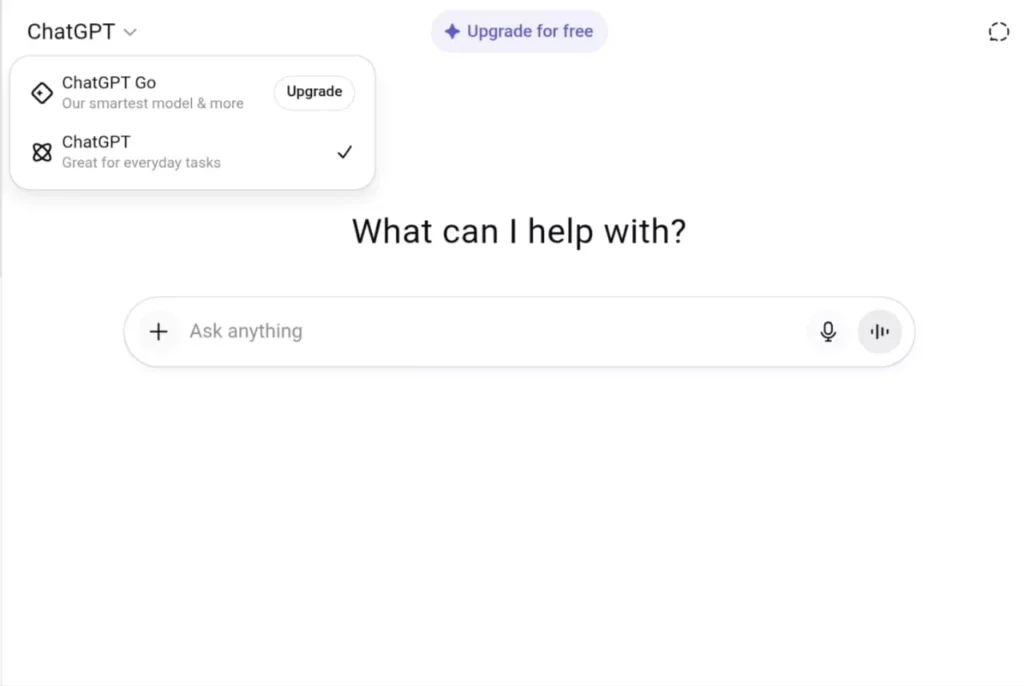
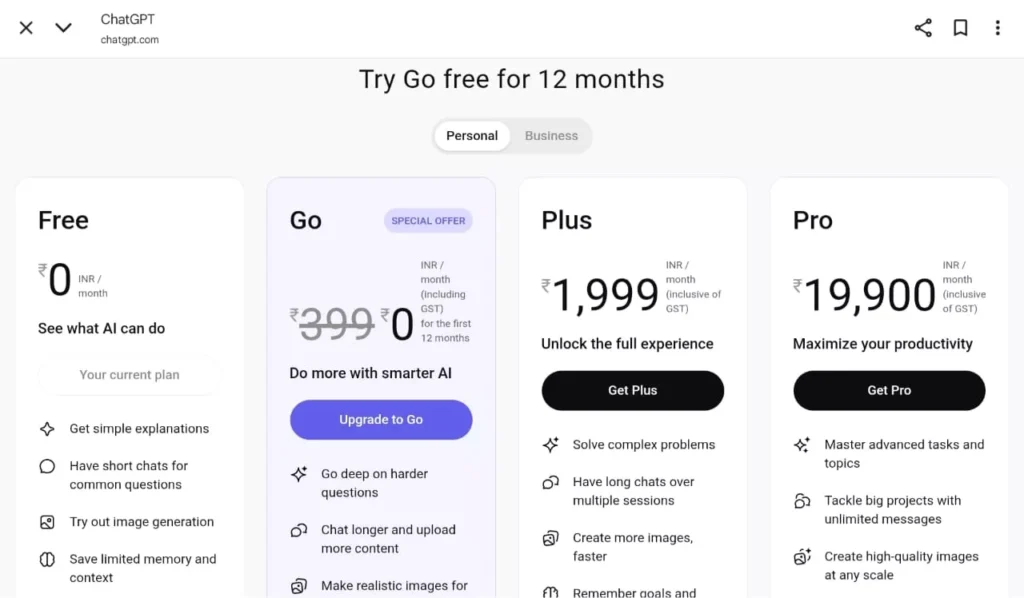
First of all, visit the official site of ChatGPT through your browser or using an application. Now, if you are an existing ChatGPT user, sign in using your credentials. Whereas, if you are a new user, then register yourself by providing your email ID and setting up a new password. Now, you will see an option ‘Upgrade’ beside ChatGPT Go and ‘Upgrade for free’ in the center. You can click on either of them.
Read More: ChatGPT 5: Breakthrough or Breakdown? Explained With Complete Information!
Step 2: Select the ‘ChatGPT Go’ plan
The second step is to choose the plan that you want. Since we are discussing the process of upgrading the ChatGPT plan for free, currently only the ChatGPT Go plan is available for free for Indian users. So, select the ChatGPT Go plan from the list of available plans. Click on ‘Upgrade to Go’.
Step 3: Choose your Payment Method
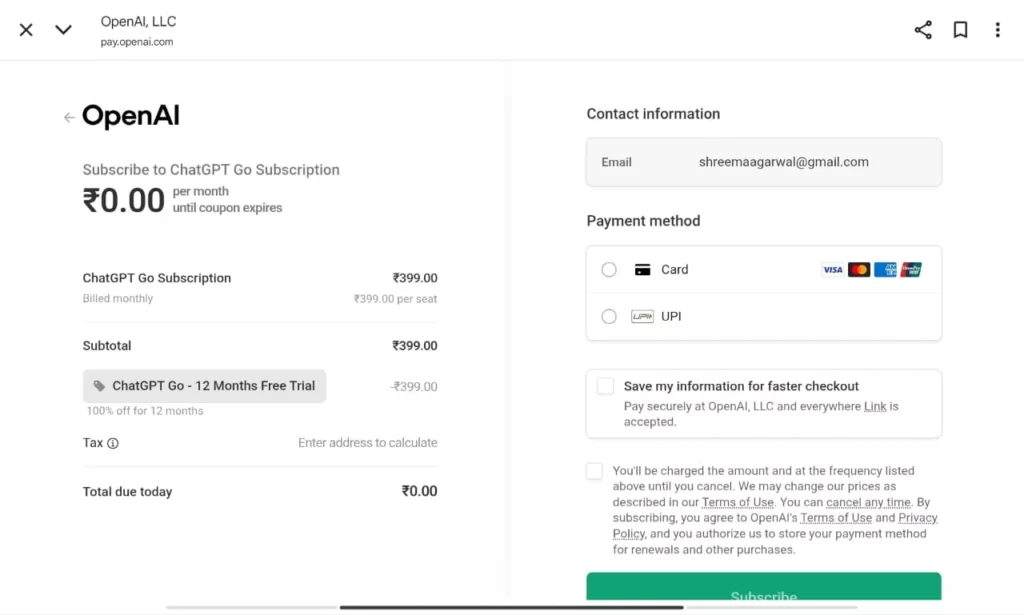
Now the next step is to enter a valid payment method. Many people are in a confusion that if the upgrade is free then why do they need to add a payment method. But you need to add a valid payment method for verification purposes. You will only be charged ₹1 to complete the authentication procedure.
There are two payment options: UPI and Cards, you can choose any of the one that you find suitable. After you select your desired payment method, enter the basic details required.
For UPI

Enter your name, address, UPI ID or VPA ID.
For Cards
Enter your name, card number, CVV, etc. Finally, after adding all the required details, check the box for Terms & Conditions and click on “Subscribe”, in the green coloured box.
Step 4: Approve Autopay
“The last and most important step is to approve the autopay. This is one of the steps where most people might make a mistake believing that they will be charged a full amount of ₹399, but you will only be asked to approve the autopay for ₹399 that you will be charged after the completion of one year of your free trial period.“
If you chose UPI as your preferred payment option, then go to your UPI application (Gpay, PhonePe, Paytm, etc) and approve the autopay. Whereas, if you chose Card as your preferred payment option, then you would have received a message regarding the same, follow the steps to complete the autopay setup. You will be charged just ₹1 for the confirmation.
Step 5: Start using ChatGPT Go for FREE
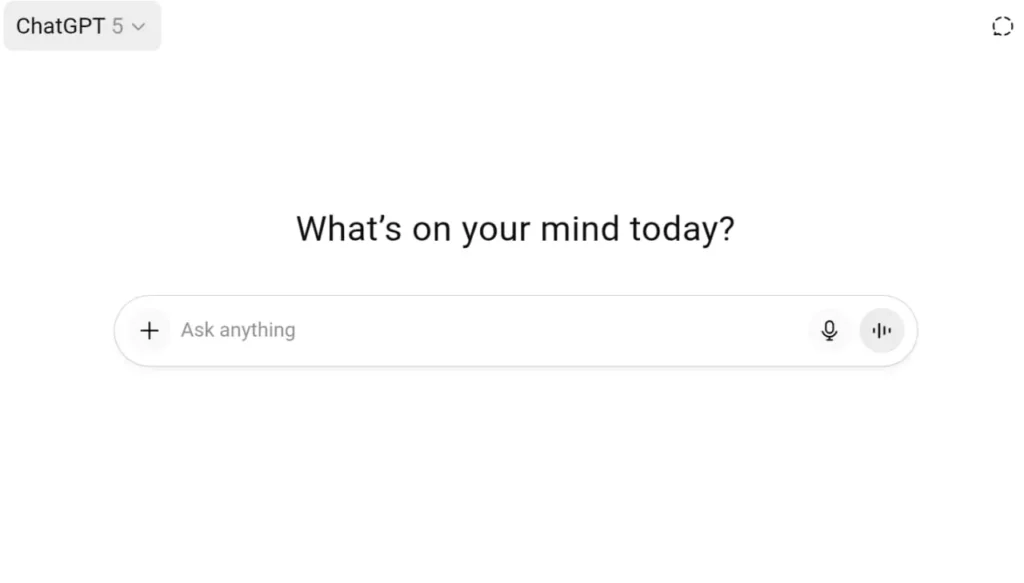
You will now be redirected to the main page of ChatGPT, where in the top left corner you will notice that ChatGPT has now changed to ChatGPT-5 (as shown in the below image), which means that you have successfully upgraded your plan to ChatGPT Go for free. You can now start using and enjoying the benefits that come with ChatGPTnGo for a duration of 1 year.
What About The ChatGPT Issue Of Payment Failure?
While upgrading to ChatGPT Go and performing the autopay setup, many people are getting an error message that says payment failed or ChatGPT isn’t working. Now, this could happen due to a lot of reasons. Let’s discuss what could be the possible reasons for the same and how you can avoid or fix it.
Possible Reasons for Payment Failures
For people getting an error message of payment failure or ChatGPT not working are mentioned below. Have a look at them.
- Verification Glitch due to heavy traffic: On November 4, 2025, many people tried to upgrade to Go at the same time which led to heavy traffic and resulted in glitches.
- Card not supported for such transactions: You have to make sure that your card is supported for international transactions. As some Indian debit cards do not support international transactions or Rs. 0 or Rs. 1 verification charges.
- Billing information error: Please note that this offer is only for Indian users, so you have to ensure that the billing information you put in has to be of an Indian user. The billing country, name, address, mobile number, everything you enter should be Indian.
Also Read: Check the Temporary Chat Feature on ChatGPT 5: Complete Explanation
How to Avoid or Fix It?
If you are also one of the users who is facing this ChatGPT issue and are unable to complete your payment process to access the ChatGPT Go for free, then you can try out the following troubleshooting methods.
1. Try a Different Payment Method
You can try switching your payment method for a smoother verification process. For example, if you are using UPI, try switching it with credit or debit cards or you can also just switch your UPI app. For example, if previously you were doing your payment through PhonePe, you can try it now through Google Pay.
2. Clear Cache and Retry
Sometimes the cache blocks your payment on browsers and applications, so you can just clear it from settings and retry doing the verification process. You can also open the window in incognito mode to complete the process.
3. Enable International and Subscription Transactions
Now, many Indian debit cards do not support international transactions or verification subscriptions of ₹0 or ₹1. You have to ensure that all of that is enabled. For that, you can either contact your bank or change the settings through your bank’s mobile application in the Cards Control section. You have to ensure that it supports international payments, auto-debit payments, and verification subscription transactions.
4. Retry After Some Time
If you still face the issue, you can simply close the browser or mobile application and try after a few hours. The ChatGPT issue might be happening due to heavy overload or heavy traffic on the site, which would be resolved in a few hours. So, I would suggest taking a short break and then try to upgrade it in a few hours.
Upskill With Pregrad🚀
Are you also fascinated by the ChatGPT Go upgrade that OpenAI has announced? Then this is your chance to pair this golden opportunity with the right learning platform and upskill yourself with the right skills you need to get a high-paying job in this competitive technology-driven world.
Pregrad offers specialized learning programs in Artificial Intelligence and Machine Learning and various other areas that will help you to survive this competitive market with ease. You will get career assistance, 1:1 mentorship, resume building tips, and a chance to gain real exposure by working on real projects.
Mentors at Pregrad don’t just focus on theoretical knowledge. Instead, they provide you with conceptual knowledge that will help you to perform better in a real working environment.
ChatGPT GO Payment Failure FAQs
Q1. Is the ChatGPT Go upgrade free?
Ans: Yes. You have to provide a payment method to complete the verification process. You will be charged just ₹1 and not the full amount of ₹399.
Q2. How can I prevent this kind of problem in future when using AI tools like ChatGPT for my business?
Ans: You can avoid this problem by following the below points:
- If the issue still remains, it may be due to heavy traffic on the site. Try it after some time.
- Keep your billing details up to date.
- Always enable international and subscription charges on your card.
- Try using a stable internet connection.
Q3. After payment succeeds, ChatGPT still says “upgrade required”, what should I do now?
Ans: Simple logout and log in again, the problem will be solved.
Q4. Can I use any payment method that is cards or UPI?
Ans: Yes, you can use UPI or Cards as your preferred payment option. Just make sure that your card has international transactions and subscription transactions enabled.