

Gemini vs ChatGPT is an endless debate with many wondering which tool can give more enhanced results. Check out some of the best prompts by both Gemini vs ChatGPT like LinkedIn profile creation and more, and decide for yourself which one you would choose for image generation.
After the recent Google Gemini Nano Banana Trend, Gemini has gained popularity among students as well as professionals because of its highly creative image generation capability. OpenAI’s ChatGPT is also not behind, you might remember a past trend, Ghibli image generation, which brought in news and highlighted the image generation capability of ChatGPT.
The debate between Gemini vs ChatGPT is endless, and I am not going to state which is better. Let’s have a look at different prompts used for image generation for various purposes and make your decision on who the winner is.
Table of Contents
Differences In Image Generation: Gemini vs ChatGPT
You know, you are living in the future when you have to test chatbots to see which one gives better results. Both Gemini vs ChatGPT give incredible results for queries and image generation, but there’s always one better than the other. Now, it depends on you what kind of images you are looking forward to generating, whether they are realistic images that include facial features, or they are animated or object images.
ChatGPT is great for generating non-living, animated images, object images, or refining old images, but for realistic, people’s images, Gemini would be a better choice. ChatGPT sometimes does not match the exact facial features, which results in the image looking less realistic. We will generate images with both Gemini and ChatGPT using a similar prompt to check which one provides better results.
Best AI Prompt For LinkedIn Profile Picture Generation
LinkedIn, a platform mostly used by young adults and professionals to hunt job and internship opportunities. But has it ever crossed your mind how you can get a perfect, professional-looking, clean picture for your LinkedIn profile? Well, with Artificial Intelligence, that’s no more a tough job.
To save your time and hard work, after trying multiple prompts, I’ve found the best prompt for creating a LinkedIn profile pic. Check out the best prompt for generating your LinkedIn profile picture within seconds.
Upload your image, give the prompt mentioned below.
| Prompt: Generate a photorealistic headshot suitable for a professional LinkedIn profile. The subject should be the same as the uploaded image, with all the facial features exactly the same (representing a student/recent graduate), looking directly at the camera with a friendly, confident, and approachable expression.The lighting should be soft, even, and flattering, avoiding harsh shadows. The subject should be wearing professional or smart-casual attire (e.g., a blazer, collared shirt, or professional blouse).The background should be a plain, static color (e.g., a solid light grey, soft blue, or off-white) or a very subtly blurred office/professional setting that doesn’t distract from the subject. The focus should be entirely on the individual’s face and upper shoulders. The image should convey professionalism and competence. |
I asked both Gemini and ChatGPT to generate a real-looking image for a LinkedIn profile picture. These are the results I got in Gemini vs ChatGPT images.
Gemini

ChatGPT

Conclusion: Both Gemini and ChatGPT created decent images, but when you upload your own image to recreate it, the facial features might not be an exact match in ChatGPT. Therefore, my pick for LinkedIn profile pic creation would be Gemini.
Product Designing Prompt For Gemini & ChatGPT
Let’s suppose you are a product designer and want to design a new product (let’s say headphones) for your brand. You can try ChatGPT or Gemini AI photo prompt copy paste it and get the results. I am sharing a sample prompt for product designing. You can tailor it according to your product and requirements.
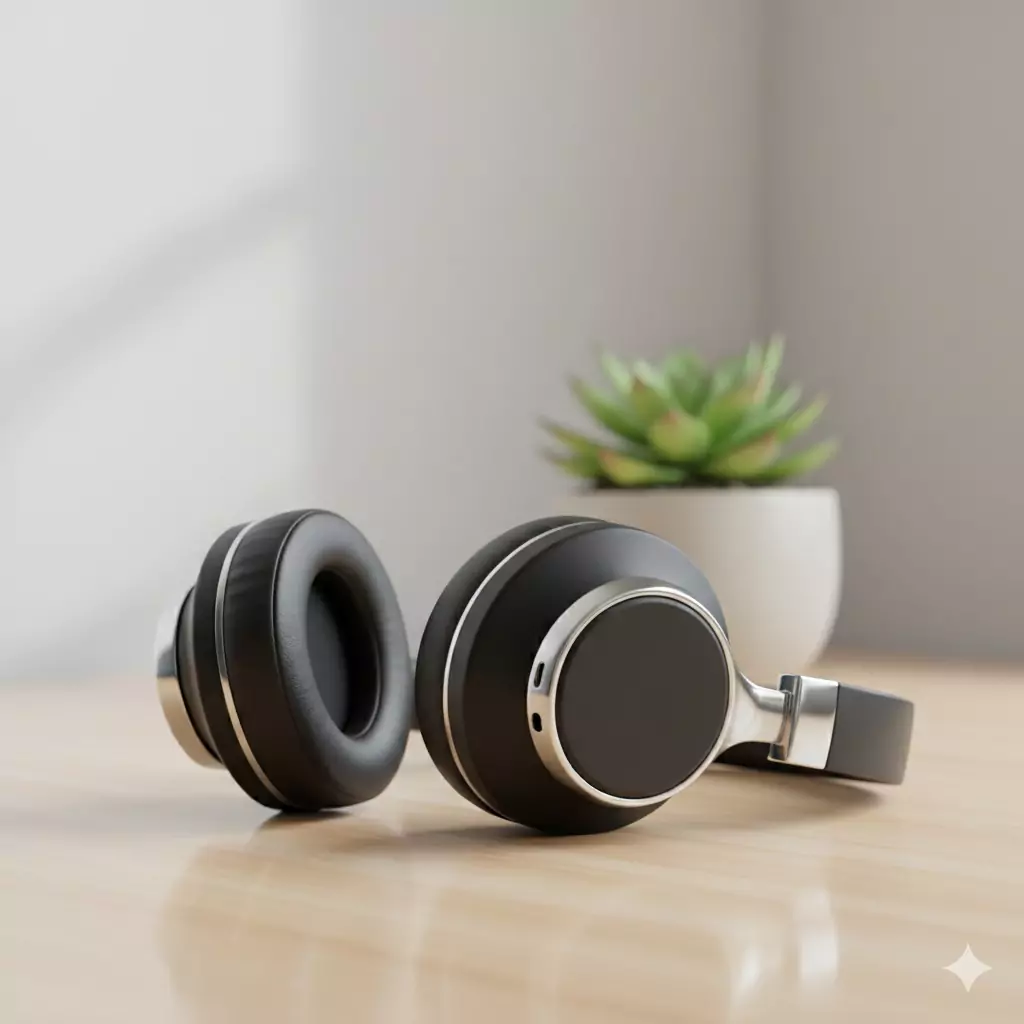
| Prompt: A professional hero shot of a compact, over-ear wireless headphone model. The headphones have a matte black ceramic finish with polished chrome accents. They are resting on a minimalist wooden desk at a slight 45-degree angle. Use soft ambient studio lighting to highlight the texture, with a subtle product reflection beneath the object. The background should feature a single, out-of-focus (bokeh) succulent plant. Photorealistic 4K render. |
I gave the same prompt to both ChatGPT and Gemini for generating a product image of headphones, have a look at the results I got.
Gemini
ChatGPT
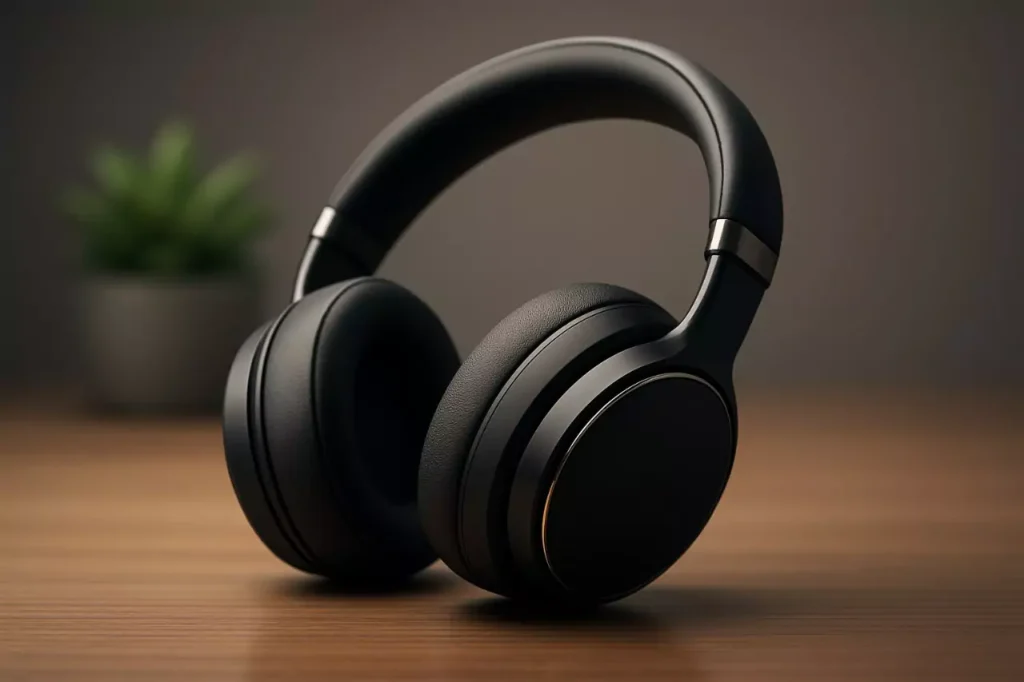
For designing a product, both Genmini and ChatGPT are in a top-notch competition. It is difficult to decide which one generated a better image. This is the power of AI, it doesn’t even let you choose between the two options that you have.
Conclusion: Both Gemini and ChatGPT can be used for generating an object or product-based image.
Restoring Old Black and White Photos Prompt With ChatGPT & Gemini
Old pictures hold memories. With the help of AI, you can now restore your old photos and make them look like they were taken just today. Let’s try out a sample prompt to both Gemini and ChatGPT and check which one gives better results.
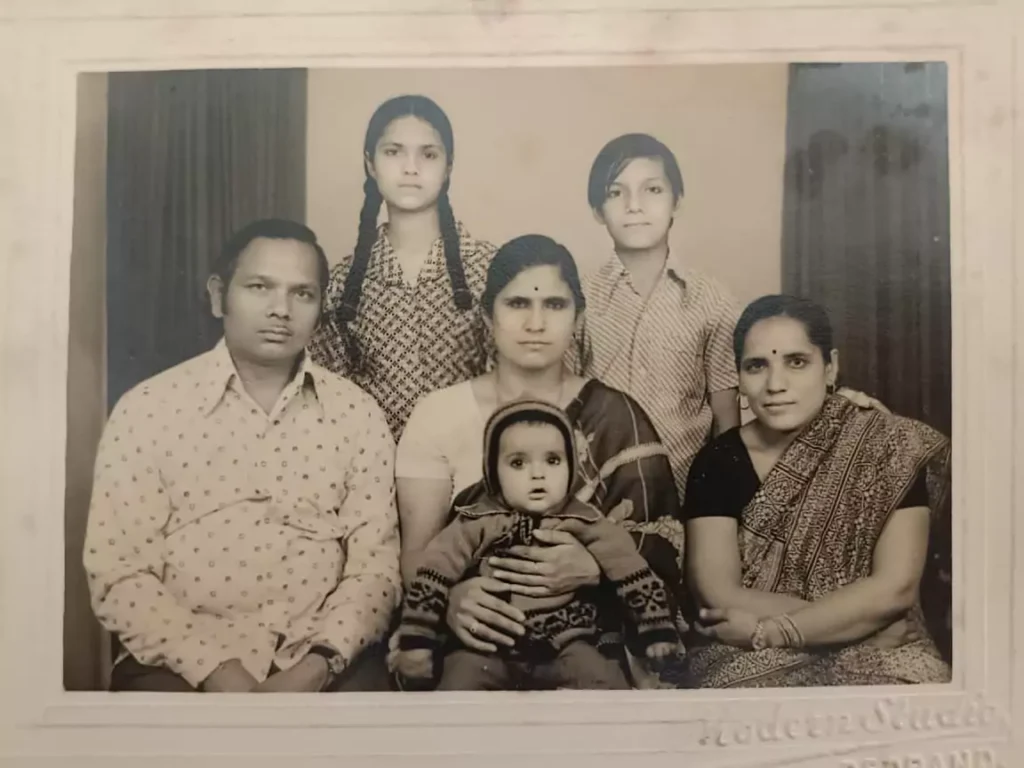
| Prompt: Fully restore, clean, and enhance the uploaded black and white image: remove all scratches, creases, and film grain noise. Sharpen the facial features, clothing details, and background elements naturally. Then, naturally colorize the entire scene with realistic hues and skin tones appropriate for the era and bright daylight. The final output should be a high-resolution, photorealistic image with vibrant, yet authentic, colors, as if it were a new photograph taken today. |
I uploaded an old family image to convert it to a fresh, revived image.
Let’s have a look at the results of Gemini vs ChatGPT.
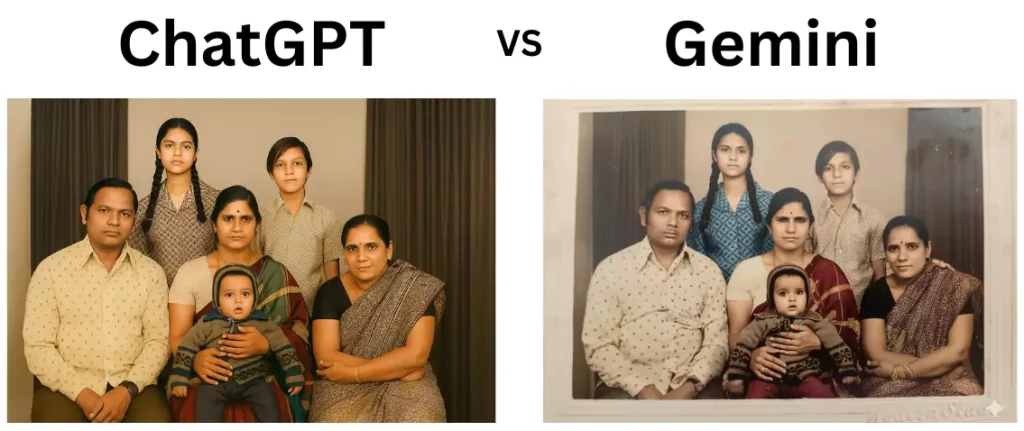
Clearly, ChatGPT won this round. It revived the image as if it were really taken today. Gemini focused on giving realistic results and generated a decent image but the results by ChatGPT are impressive.
Conclusion: Both Gemini and ChatGPT gave good results, but if you ask me which one I would be using to restore and revive my old images, then my pick for this prompt would be ChatGPT.
What You Get For Free?: Gemini vs ChatGPT Edition
Let’s have a look at what you get in ChatGPT and Gemini for free.
ChatGPT
- You get access to GPT-3.5 and a limited version of GPT-4/4o
- You can summarize notes, ask questions, etc
- You can generate images for free, but the limit is only 3 to 4 images per day
- There is a voice conversation feature to avoid long typing
Gemini
- You get limited daily access to Gemini 2.5 Pro for complex searches
- You can summarise notes from text or videos
- You can generate as many images as you want for free
- You can use Gemini within other Google apps like Docs, Sheets, Gmail, etc
- You can even use the voice conversation feature to avoid long typing
Can Video Be Uploaded to Google Gemini in Prompts?
Recently, I have heard a common question going around people’s minds: can video be uploaded to Google Gemini in prompts? Well, the short and crisp answer to the question is YES. Let’s understand how.
If you are a free user of Gemini, then you can upload a video of up to 5 minutes, whereas there is no limit for the paid versions. Let’s understand with the help of an example of how this works.
For example:
- You upload a video of a cooking show that you like and ask Gemini to “Summarize the recipe shown in the video and list down the ingredients”. This will save your time and energy that you would waste while checking the video again and again when cooking.
- Another example could be, suppose you have an exam tomorrow and you are studying from an online video which is too long to be completed in a night, you can simply upload it to Gemini and ask to “Summarize the topics covered in the video and list down the key points”.
Gemini vs ChatGPT: Who’s the Winner?
It is difficult to state the winner, as both chatbots have their own capabilities. But let’s decide which performed better, on the basis of the prompts we covered.
| PROMPT | GEMINI (Results) | CHATGPT (Results) |
| LinkedIn profile picture | Excellent | Decent (sometimes facial features do not match) |
| Product Design | Good | Good |
| Restore old images | Decent (colors could’ve been better) | Excellent |
Both Gemini and ChatGPT have their own capabilities for image generation. You can’t just go on with any one of them. It is best to use both as per requirements to get the best results. For example, you can use ChatGPT for the idea, object image generation, and refining old images, whereas Gemini can be used for creating realistic images and editing images.
Upskill With Pregrad🚀
The creative AI is shaping the future of the world. If you are fascinated by tools like Gemini and ChatGPT and curious to learn more, Pregrad can help turn your curiosity into career growth.
Pregrad is an online learning platform, providing specialised, beginner-friendly courses in top and in-demand domains like AI/ML, Data Science, and more. The mentors at Pregrad focus on providing the students with practical knowledge by making them work on real projects instead of making them mug up concepts.
You will get complete career assistance, access to live and interactive sessions, and a chance to become job-ready in less than a semester. Join Pregrad today, become Pre-Graduated!
Gemini vs ChatGPT FAQs
Q1. Which is better: Gemini or ChatGPT?
Ans: If you want to create a realistic image of the people showing their facial features, then Gemini would be the right pick. However, for generating object-based, artistic images both ChatGPT and Gemini are a good choice.
Q2. How to generate images using ChatGPT or Gemini?
Ans: Visit the official site of whichever platform you want to use, give the desired prompt and your image will be generated. If you want to re-generate or create a new image using an existing image, then upload your existing image, type the prompt and send. Your new image will be generated soon.
Q3. How to write the perfect prompt for image generation?
Ans: The best way to write a perfect prompt is to be descriptive, focus on the ‘who’, ‘what’, and ‘where’ framework. Make sure to include the details about style, lighting, mood and background. Remember, these are all just the chatbots generating images, the more context you provide, the better your image will be.
Q4. Are there any limitations for image generation?
Ans: Well, yes. Both the tools have certain limitations like Gemini’s image generation is not for users under 18 whereas ChatGPT have a limit on the number of images you can generate per day.